
How Samsung One UI 8 Will Revolutionize Smartphone Security and Theft Protection
In an era where our smartphones hold our entire digital lives, security has never been more critical. While Google initially introduced advanced theft protection for Android in 2024, the landscape is evolving rapidly. These essential security layers were first integrated into Samsung Galaxy devices during the One UI 7.0 rollout. However, recent announcements from Google suggest that the upcoming One UI 8 update will take these defenses to a whole new level, making it nearly impossible for unauthorized users to access or misuse stolen hardware.
- ✨ Enhanced Remote Lock featuring optional security challenges.
- ✨ New dedicated toggles for Failed Authentication Lock control.
- ✨ Biometric-mandatory Identity Checks for untrusted locations.
- ✨ Intelligent Screen Lock Guessing prevention with child-safe retry logic.
The Next Generation of Android Theft Protection
The transition to Android 16 as the backbone for One UI 8 brings sophisticated tools designed to outsmart even the most determined thieves. Google’s latest security blog post outlines several core improvements that target the most common vulnerabilities found in stolen devices. These updates focus on three pillars: prevention, immediate lockdown, and remote recovery.
Smarter Failed Authentication and Identity Checks
One of the most significant changes is the enhancement of the Failed Authentication Lock. This feature automatically freezes the device after a specific number of unsuccessful unlock attempts. In the One UI 8 ecosystem, users will now have access to a dedicated toggle, allowing for granular control over how and when this lockdown occurs.
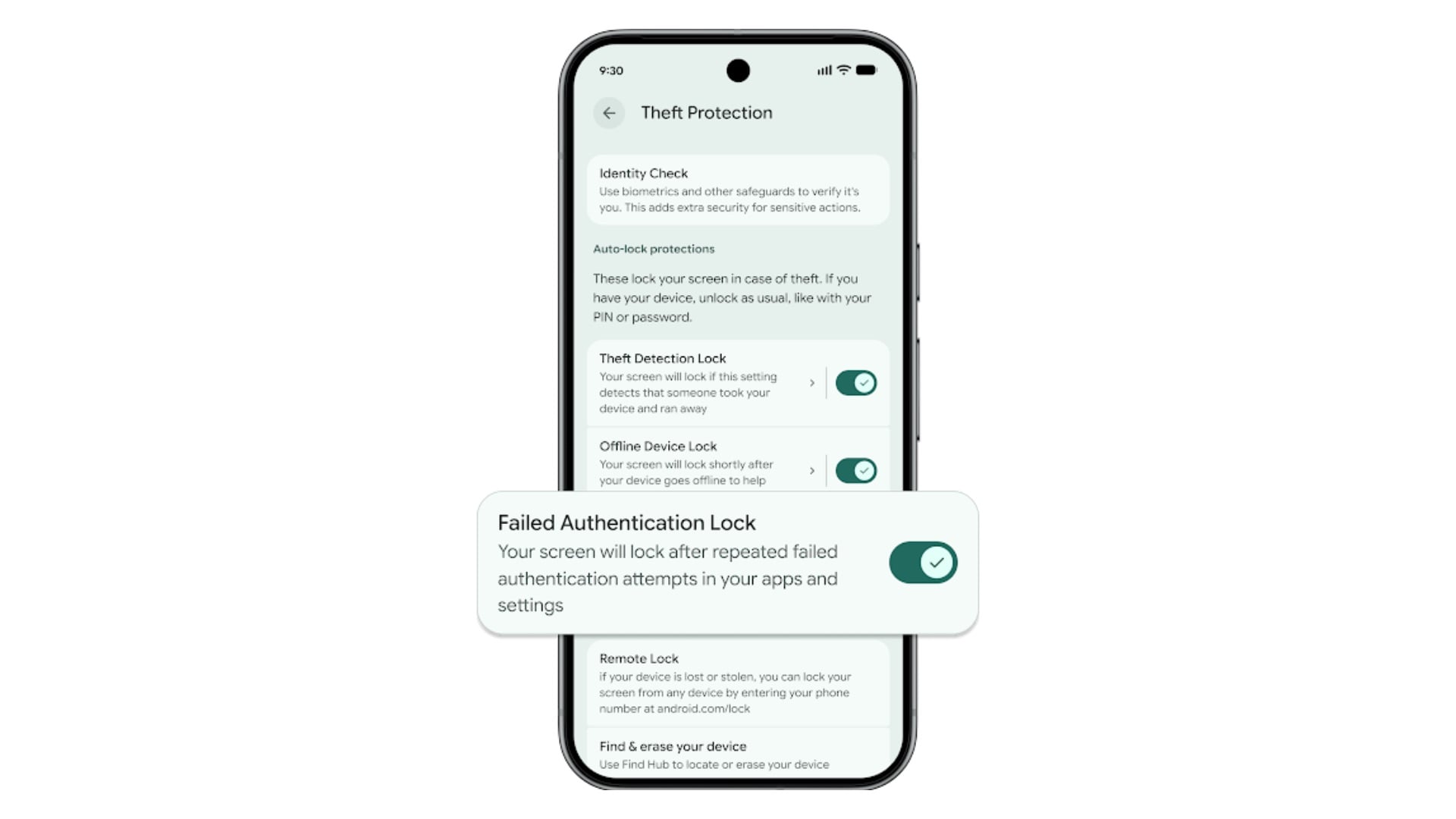
Furthermore, the Identity Check feature is being expanded. Originally debuted with Android 15, this tool mandates biometric authentication (such as fingerprint or facial recognition) for sensitive actions if the phone is detected outside of "trusted locations" like your home or office. With the new update, any application or service that utilizes the standard Android Biometric Prompt will be able to leverage this high-security requirement by default.
Deterring Thieves and Protecting Families
Google is also addressing "brute force" attempts to bypass security. The Screen Lock Guessing prevention system will now significantly increase the lockout duration if an incorrect PIN, pattern, or password is entered repeatedly. Interestingly, the system is now smart enough to recognize accidental inputs; for instance, if a child is playing with the device and enters the same wrong guess multiple times, it will not count against the retry limit.
For those who lose their devices entirely, the Improved Remote Lock offers a final line of defense. Users can now add an optional security question or a specific challenge to the remote locking process. This ensures that only the rightful owner—and not a malicious actor who might have gained access to your recovery account—can initiate the lockdown. This feature is remarkably inclusive, supporting devices running all the way back to Android 10.
It is also worth noting that in certain regions, such as Brazil, Google is taking a proactive stance by enabling Remote Lock and Theft Detection features by default on all new Android devices. This global push for security ensures that Samsung Galaxy users worldwide will benefit from a more secure mobile experience.
When will One UI 8 be available for my Galaxy phone?
One UI 8 is expected to roll out following the official release of Android 16. Typically, Samsung begins its beta program in the late summer or early fall, with stable releases hitting flagship devices like the S-series by the end of the year.
What is the "Identity Check" feature exactly?
Identity Check is a security layer that detects if your phone is in an unfamiliar location. If it is, the phone will require biometric data (like your fingerprint) to access secure settings or apps, even if the phone was already unlocked with a PIN.
Can I use the new Remote Lock on an older Samsung phone?
Yes! Google has confirmed that the improved Remote Lock features, including the optional security questions, will be compatible with most devices running Android 10 or newer, covering a vast majority of Galaxy phones currently in use.
Will these features slow down my phone's performance?
Not at all. These security features are integrated at the system level and only activate during specific security events or when the device detects it has been stolen. They do not impact daily performance or battery life.
🔎 In conclusion, the arrival of One UI 8 represents a major milestone for Samsung in its quest to provide the most secure mobile experience on the market. By integrating Google’s latest theft protection advancements with Samsung's own robust Knox security framework, Galaxy users can rest easy knowing their personal data is protected by multiple layers of intelligent, proactive defense. Whether it's through smarter biometric prompts or enhanced remote recovery tools, the future of smartphone security looks brighter and more resilient than ever before.
Post a Comment