
Samsung Galaxy S26 Revolutionizes Audio: AI Audio Eraser Now Cleans Up Your Favorite Livestreams
The debut of the Galaxy S25 series last year introduced us to one of the most innovative One UI 7.0 features: the Audio Eraser. While it was already a game-changer for video editing, Samsung is taking things to a whole new level this year. With the official rollout of One UI 8.5 alongside the Galaxy S26 lineup, the Audio Eraser has received a massive upgrade that finally brings support for third-party applications.
- ✨ Third-Party Integration: Now works seamlessly with apps like YouTube, Netflix, and Instagram.
- ✨ Live Noise Removal: Eliminate background distractions from any livestream in real-time.
- ✨ Quick Toggle Access: Enable the feature instantly via the status bar without leaving your app.
- ✨ Cross-Chip Support: Optimized for both Snapdragon 8 Elite and Exynos 2600 processors.
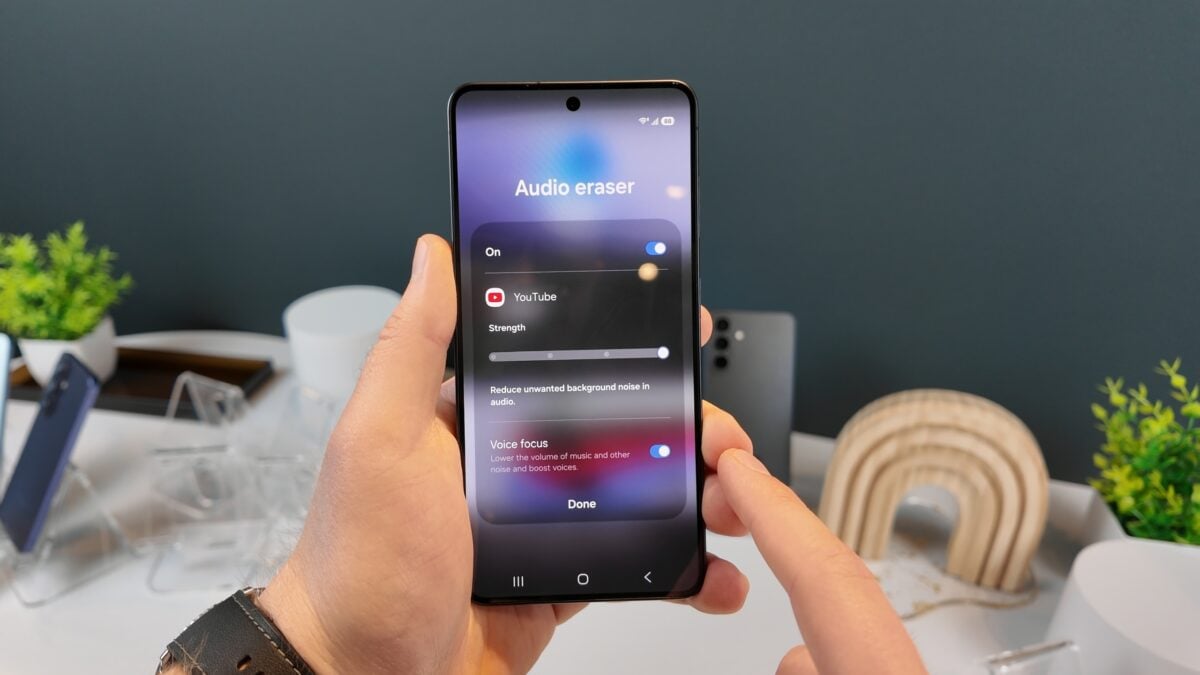
Originally, the Audio Eraser was a powerful post-production tool. It allowed users to dive into the Gallery app, tap an AI-powered button, and scrub away unwanted background noises from recorded videos. It was impressive, but its utility was confined to files already saved on the device. That limitation is now a thing of the past.
Beyond Editing: Real-Time Audio Enhancement
Samsung has confirmed that the Galaxy S26’s enhanced Audio Eraser can now process audio streams from third-party apps on the fly. This means if you are watching a noisy livestream on YouTube or a documentary on Netflix where the background ambiance is overpowering the dialogue, the AI can intervene and clean the audio as you listen. This evolution turns the tool from a niche editor into a daily utility for content consumption.
The company specifically highlighted support for major platforms, including Instagram, YouTube, and Netflix. This ensures that no matter where you get your entertainment, the One UI 8.5 experience provides crystal-clear sound quality.
How to Use Audio Eraser on the Galaxy S26
Samsung has prioritized ease of use by integrating the feature into the system's Quick Panel. Much like the "Live Captions" feature, you don't need to dig through complex settings menus to find it. Here is how you can activate it:
- While watching a video or livestream, simply swipe down from the top of the screen to open the status bar.
- Locate the Audio Eraser quick toggle and tap it.
- The AI immediately begins processing the active audio stream, allowing you to stay immersed in your app.
Universal Performance Across Regions
When the original tool launched, many believed it was a specific capability of the Snapdragon 8 Elite chip. However, Samsung has successfully optimized these AI algorithms for their in-house hardware as well. Whether your Galaxy S26 or S26+ is powered by the Exynos 2600 or the Snapdragon 8 Elite, you will have access to the same high-quality audio cleaning capabilities. As always, the Galaxy S26 Ultra will feature the Snapdragon chip globally, ensuring top-tier performance for every user.
Which apps support the new Audio Eraser feature?
Samsung has confirmed that the updated Audio Eraser works with popular third-party streaming and social media apps, including YouTube, Netflix, and Instagram, among others.
Do I need a specific processor to use this tool?
No, the feature is available on the entire Galaxy S26 series, regardless of whether the device uses the Exynos 2600 or the Snapdragon 8 Elite processor.
Can I use Audio Eraser for live content?
Yes, the primary upgrade in One UI 8.5 is the ability to remove background noise from livestreams in real-time, rather than just saved videos.
How is it different from the version on the Galaxy S25?
The Galaxy S25 version was limited to editing videos within the Samsung Gallery app. The S26 version works system-wide across third-party applications.
🔎 The evolution of AI on mobile devices is moving from simple photo edits to enhancing our real-time digital experiences. The Galaxy S26’s updated Audio Eraser is a perfect example of how Samsung is using artificial intelligence to solve practical, everyday problems like noisy livestreams. As One UI 8.5 continues to roll out, this feature will likely become a favorite for anyone who consumes video content on the go, proving that the future of smartphones is as much about what we hear as what we see.
Post a Comment