
Samsung Galaxy S26 Ultra Privacy Display: New Leaks Reveal Game-Changing Security Settings
Samsung's next non-foldable flagship smartphone, which is expected to be the Galaxy S26 Ultra, is said to bring multiple hardware upgrades over the current one, the Galaxy S25 Ultra. The most noteworthy of them could be the Privacy Display, which the brand has been teasing lately. This innovative technology aims to redefine how we interact with our devices in public spaces, ensuring that sensitive information remains for your eyes only.
- ✨ The new Privacy Display feature eliminates the need for physical privacy screen protectors.
- ✨ Leaked settings reveal "Auto Privacy" and "Maximum Privacy" modes for enhanced security.
- ✨ Intelligent "Privacy Triggers" activate based on location and the specific content being viewed.
- ✨ Custom conditions allow users to define exactly when and where the privacy shield turns on.
Privacy Display can limit the viewing angle of the content on the screen to prevent people beside you from looking at it, enhancing your privacy and eliminating the need for privacy screen protectors. Well, today we get to take a look at its settings, giving us a better idea of how it works on the upcoming Galaxy S26 series.
Deep Dive into the Leaked Privacy Display Settings
On X, the well-known leaker Tarun Vats has shared screenshots from the Galaxy S26 Ultra’s Privacy Display settings. Its description reads: “Protect your privacy by turning on the Privacy Display anytime.” According to Samsung, the feature will be “turned on automatically when conditions are met.” This automation suggests a seamless integration into the One UI experience
The first option is Auto Privacy. It will automatically turn on Private Display when you use apps with sensitive information and when you are in crowded places. The second option is Maximum Privacy, which will reduce the brightness of the screen to limit the visibility of the content on the screen to people beside you even further. Then there's Custom Conditions. We assume that this option lets you customise when and where the Privacy Display should turn on.
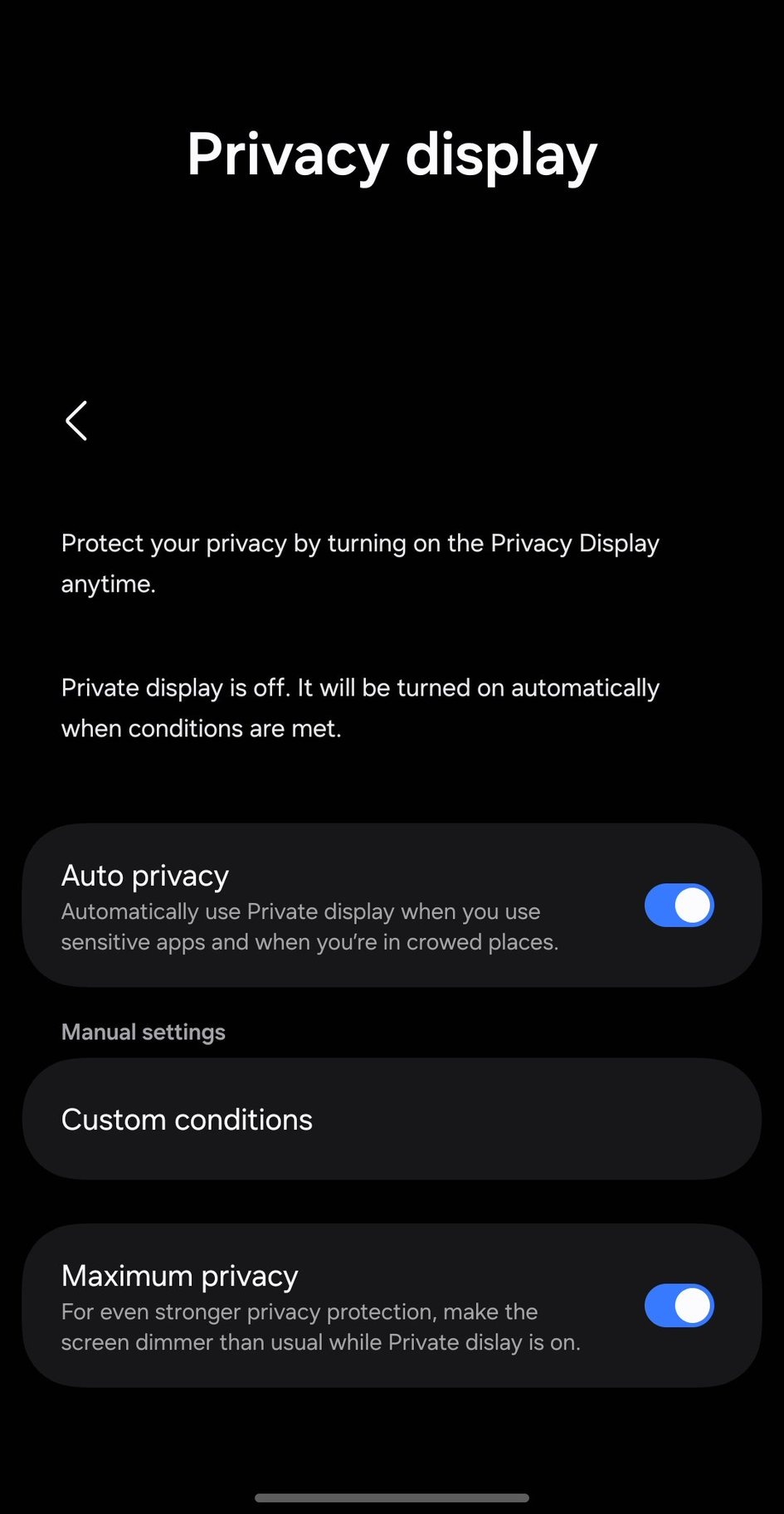
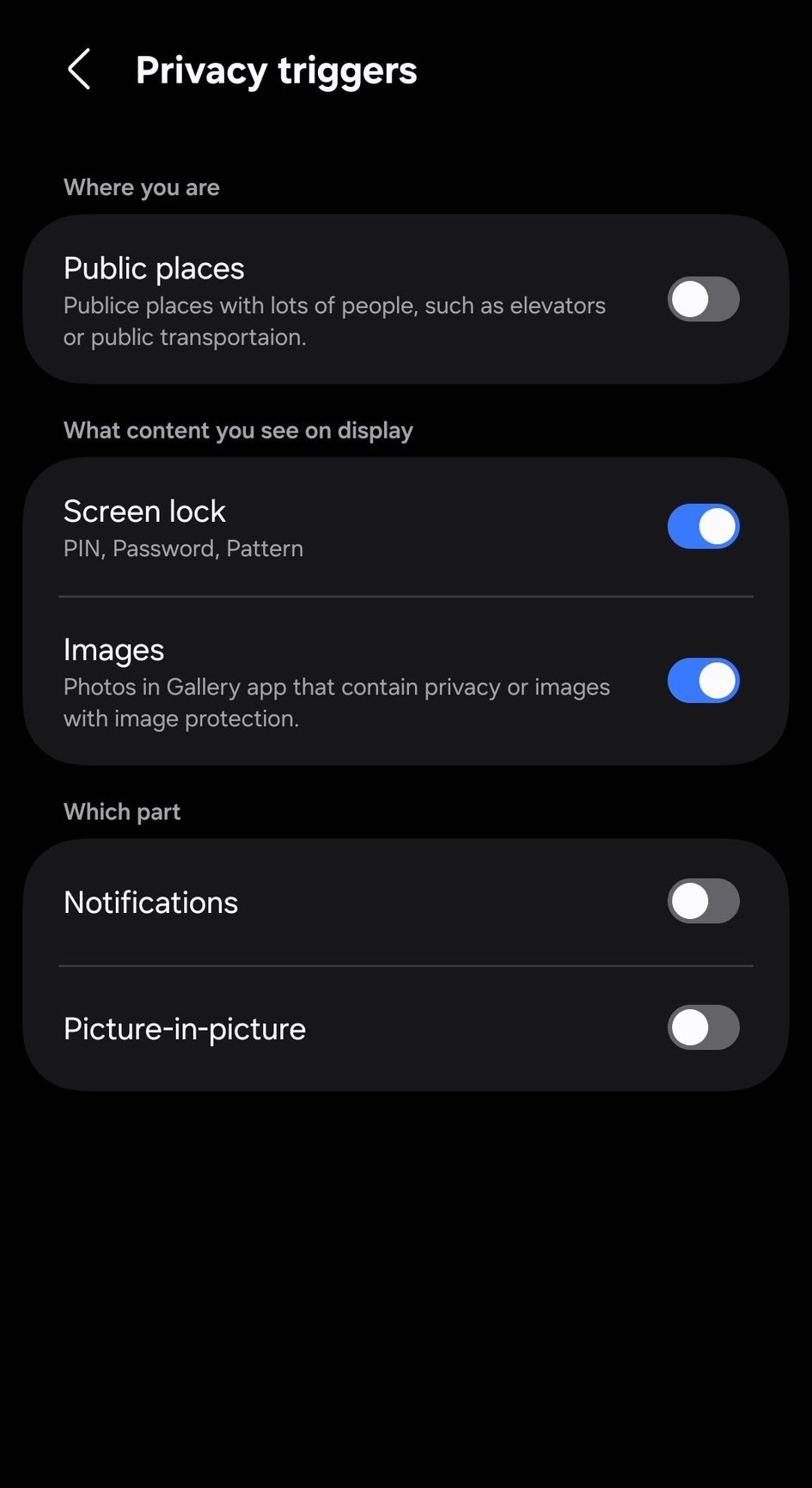
In the second screenshot, you can see Privacy Triggers. It has three sections: ‘Where you are,’ ‘What content you see on display,’ and ‘Which part.’ This level of granularity suggests that Samsung is using advanced sensors and potentially AI to determine the environment and the sensitivity of the displayed data in real-time.
What exactly is the Privacy Display on the Galaxy S26 Ultra?
The Privacy Display is a new hardware-based feature that allows the screen to narrow its viewing angles. This makes the content visible only to the person directly in front of the phone, preventing "visual hacking" or shoulder surfing in public places.
Do I still need to buy a privacy screen protector?
No, the goal of this feature is to eliminate the need for third-party privacy films. Since it is integrated into the display itself, you can turn it on or off as needed, unlike a permanent screen protector which often reduces screen clarity and brightness permanently.
How does the "Auto Privacy" mode work?
Auto Privacy uses "Privacy Triggers" to detect when you are in a crowded location (via GPS or sensors) or when you open specific apps that contain sensitive data, such as banking apps or private messengers, automatically engaging the privacy shield.
What is the difference between Auto and Maximum Privacy?
While Auto Privacy balances visibility and security based on context, Maximum Privacy goes a step further by significantly reducing screen brightness and applying the strictest viewing angle limitations possible for high-risk environments.
Can I set specific locations for the Privacy Display to turn on?
Yes, the "Custom Conditions" and "Where you are" triggers suggest that users can whitelist or blacklist specific locations, such as a commute on a train or a busy office, to ensure the feature is active exactly where it's needed most.
🔎 As Samsung continues to push the boundaries of display technology, the Galaxy S26 Ultra is shaping up to be more than just a performance powerhouse; it's becoming a leader in personal data protection. The introduction of a native Privacy Display is a thoughtful response to the growing need for digital security in an increasingly mobile world. We look forward to seeing how this hardware performs in real-world conditions during the next Galaxy Unpacked event.
Post a Comment