
Android Users Rejoice: Partial Text Selection Coming to Google Messages
The transition of Google Messages as the primary messaging platform for Android and Galaxy devices was a strategic move to unify the RCS experience across the Android ecosystem. While the app offers a modern interface and robust features, many long-time Samsung users have missed specific functionalities found in the original Samsung Messages app. One of the most significant "missing pieces" is the ability to select and copy only a specific portion of a text message rather than the entire block. Fortunately, Google is finally bridging this gap with a new update currently in testing.
- ✨ Google Messages beta version introduces a highly requested partial text selection tool.
- ✨ A redesigned context menu enlarges text for easier highlighting and copying.
- ✨ The feature is designed to match functionalities previously exclusive to Samsung's native app.
- ✨ Users can expect a stable rollout of this feature in the coming weeks.
Enhanced Precision: How the New Selection Tool Works
According to recent findings in the latest beta version of the app (build 20260212_01_RC00), Google is implementing a more intuitive way to handle conversations. When a user long-presses a message, a new context menu appears. This interface doesn't just show options; it enlarges the message text, providing handles that allow for precise dragging and highlighting. This allows users to grab exactly what they need—whether it is a single word, a confirmation code, or a specific address—without the clutter of the surrounding text.
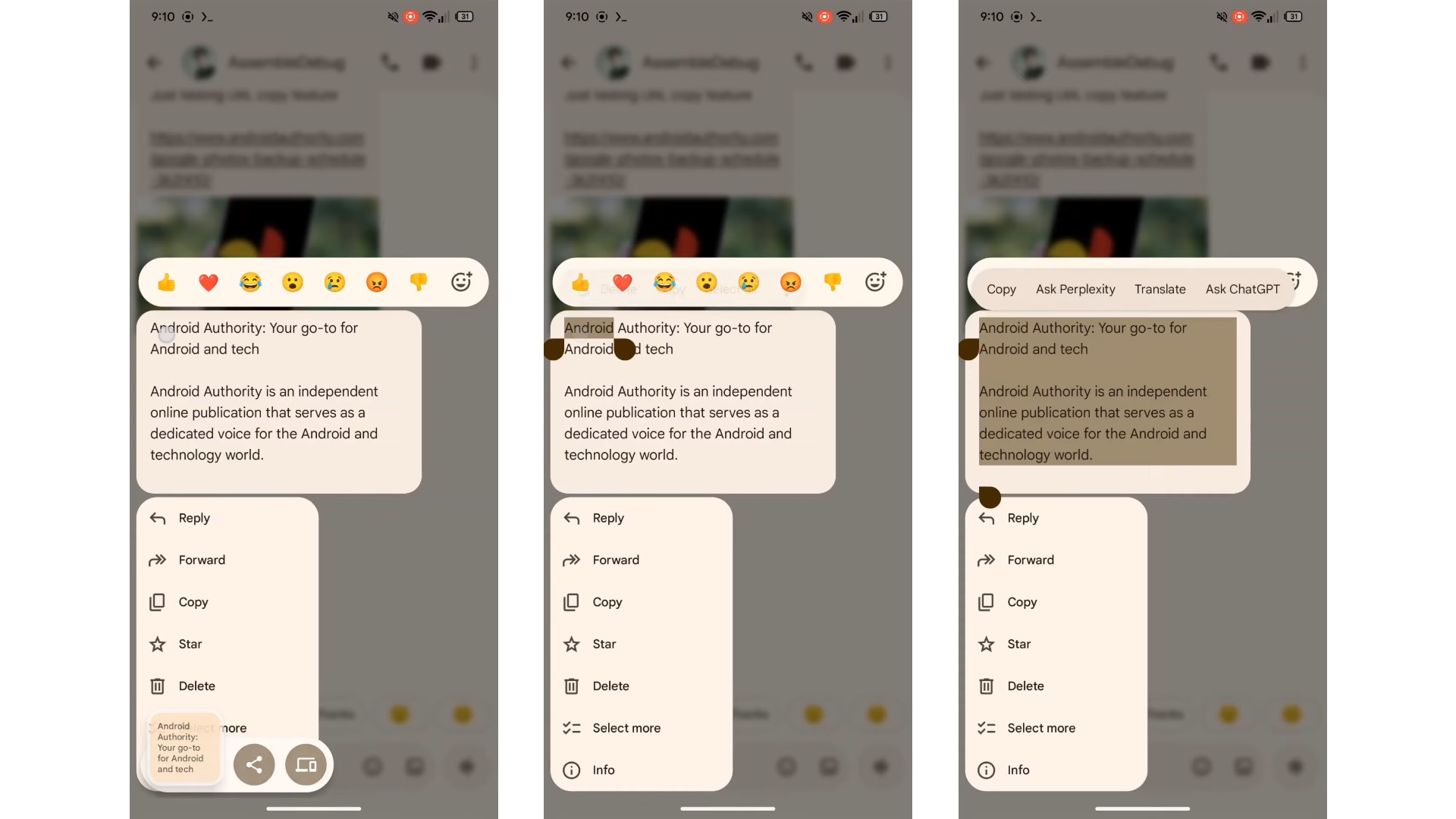
This improvement is a game-changer for productivity. Often, a single message might contain a mix of plain text, phone numbers, email addresses, or URLs. Previously, users had to copy the entire message and then manually delete the unwanted parts in another app. With this update, the Samsung Galaxy experience becomes much more seamless, aligning Google Messages closer to the sophisticated text-handling capabilities users have come to expect from premium hardware.
While the new selection method is the headliner, Google has ensured that the traditional options remain intact. The standard "Copy" command will still duplicate the entire message for those who need the full context. Other familiar actions like Delete, Forward, Reply, and Star are still prominently featured in the context menu, ensuring that the learning curve for current users remains virtually non-existent.
When will the partial copy feature be available for all users?
Currently, the feature is visible in the beta version of Google Messages. Typically, features tested in beta take a few weeks to undergo stability checks before being rolled out to the general public via the Play Store.
Does this replace the option to copy an entire message?
No, the option to copy the full message remains available. The new partial selection tool acts as an additional method for users who require more precision.
Is this feature exclusive to Samsung Galaxy phones?
While the discovery was highlighted for Samsung Galaxy users due to the app being their default messenger, it is a Google Messages app update, meaning it will eventually be available to most Android devices using the app.
How do I access the partial text selection?
Once the update hits your device, you simply need to long-press a message. A redesigned menu will appear where you can drag selection handles across the specific text you wish to highlight.
🔎 In conclusion, the addition of partial text selection to Google Messages is a small but vital update that significantly improves the user experience for Samsung Galaxy owners. By listening to user feedback and incorporating features that were beloved in native apps, Google is making its messaging platform a more powerful and flexible tool for everyone. As we wait for the stable release, it is clear that the future of Android messaging is focused on both broad connectivity and granular user control.
Post a Comment