
Samsung One UI 8.5 Revolutionizes Camera Access for Galaxy S26 Users
The release of One UI 8.5 has brought a wave of significant interface refinements that go far beyond the incremental changes seen in previous versions. Debuting alongside the powerhouse Galaxy S26 Ultra, this update focuses heavily on streamlining the user experience. Among the most notable improvements is a complete overhaul of the stock Camera app, specifically targeting how users engage with popular features like Night mode and Dual Recording to make mobile photography faster and more intuitive than ever before.
Article Summary:
- ✨ One UI 8.5 integrates Night and Dual Recording modes directly into the main Photo and Video interfaces.
- ✨ A new moon-shaped toggle allows for instant switching between Night mode settings: Off, Auto, and Max.
- ✨ Users can still revert to the classic "Modes" menu layout using the Camera Assistant application.
- ✨ These exclusive camera features are currently rolling out with the new Galaxy S26 series.
Seamless Integration of Pro-Grade Features
Samsung has listened to user feedback regarding the clutter in the "More" menu. In One UI 8.5, Night mode is no longer a hidden secondary option; it has been integrated directly into the standard Photo mode. Similarly, Dual Recording has found a permanent home within the Video mode interface. This structural change eliminates the need for tedious swiping and searching, allowing creators to capture fleeting moments with minimal delay.
When you are in Photo mode, you will notice a subtle moon-shaped icon positioned in the bottom-right corner. Tapping this icon triggers a quick-access menu with three distinct choices: Off, Auto, and Max. The "Max" setting is particularly intelligent, as it dynamically adjusts its suggested exposure time based on the ambient lighting conditions detected by the sensor. This ensures that even in near-total darkness, the Galaxy S26 can pull in enough light for a crisp shot without forcing the user to leave the main viewfinder.
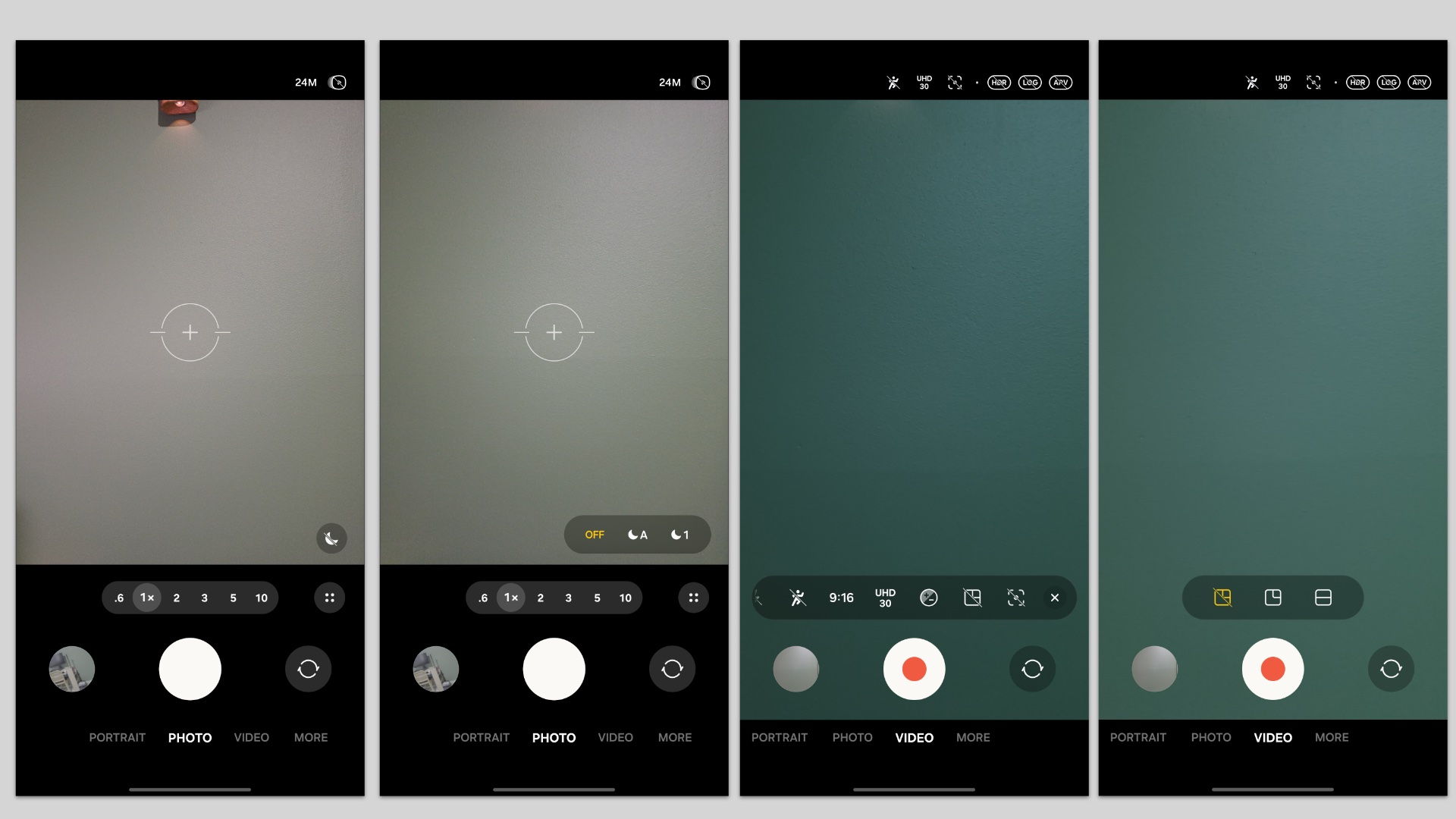
Night mode is now built into Photo mode, while Dual Recording is a toggle within Video mode.
Enhanced Video Tools and Customization
For videographers, the transition to Dual Recording is equally smooth. By simply tapping the "Options" button while in Video mode, users can toggle Dual Recording on or off and immediately select their preferred layout. This is a massive win for vloggers and social media enthusiasts who frequently swap between front and rear cameras simultaneously.
However, Samsung understands that some veteran users prefer the traditional layout. If you want to keep Night mode and Dual Recording as separate entries in the "Modes" menu, the solution lies in the Camera Assistant app. By enabling specific toggles within this utility, you can force the camera app to display these features in the old-school swipable menu, alongside Single Take and other specialized tools.
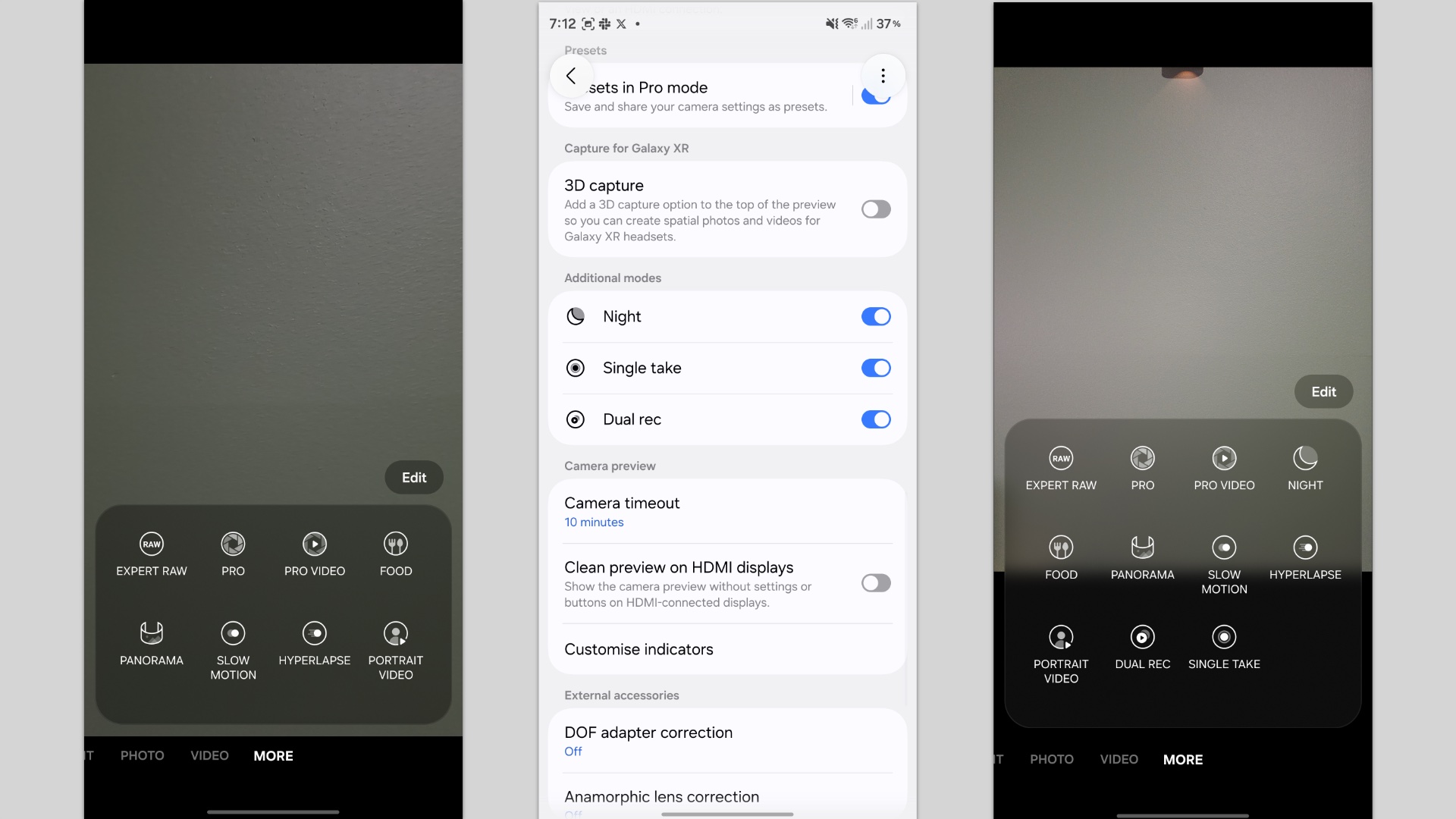
Comparison of the Camera Assistant toggles for customizing the mode selection screen.
These refinements are currently a hallmark of the Galaxy S26 series. While older devices like the Galaxy S25 are testing One UI 8.5 in beta formats, these specific camera UI optimizations remain exclusive to the latest hardware for the time being. As Samsung continues to polish the software, we expect these intuitive changes to become the new standard for the entire Galaxy ecosystem
How do I turn on Night mode in One UI 8.5?
In the new update, you no longer need to look for a separate Night mode. Simply open the Camera app in "Photo" mode and look for the moon icon in the bottom-right corner. Tapping this will allow you to select between Auto, Max, or Off.
What happened to the Dual Recording mode?
Dual Recording has been moved into the Video mode settings. While in Video mode, tap the "Options" icon to find the toggle for Dual Recording, where you can also choose your preferred screen layout.
Can I go back to the old camera menu layout?
Yes, you can. By installing the Samsung Camera Assistant app from the Galaxy Store, you can enable specific toggles that bring Night mode and Dual Recording back as standalone options in the main "Modes" swipe menu.
Is this update available for the Galaxy S25?
While the Galaxy S25 series is currently eligible for the One UI 8.5 beta, these specific Camera app UI changes are currently exclusive to the Galaxy S26 series and have not yet been integrated into the S25 beta builds.
What does the "Max" option in Night mode do?
The "Max" option forces the camera to use the longest possible exposure time available for the current lighting conditions, ensuring the brightest possible image in extreme low-light situations.
🔎 Samsung’s One UI 8.5 update marks a clear shift toward a more user-centric design philosophy. By integrating complex features like Night mode and Dual Recording directly into the primary interface, Samsung is making professional-level photography tools accessible to everyday users without the need for a steep learning curve. As the Galaxy S26 series leads the charge, these software refinements prove that sometimes the best way to move forward is to simplify the journey.
Post a Comment