
Apple's Budget Breakthrough: The Essential Guide to MacBook Neo Trade-offs
Apple has generated significant buzz in the tech market with the launch of the MacBook Neo, a bold attempt to bring the macOS experience to budget-conscious consumers starting at just $600. This release, the cheapest in the company's history, is designed to attract students and new users seeking a reliable machine with exceptional battery life, potentially lasting up to 16 hours. However, achieving this low price point has not been without cost; the device incorporates a series of technical compromises compared to higher-tier models like the MacBook Air or Pro. Here we outline the most significant trade-offs you must be aware of before making a purchasing decision.
- ✨ It represents the cheapest laptop Apple has ever released, with a competitive starting price of $600 USD.
- ✨ It boasts outstanding battery life, offering performance of up to 16 hours of continuous use.
- ✨ It foregoes standard modern features such as keyboard backlighting and True Tone display technology.
- ✨ Ports are limited, restricted to USB-C, which notably lacks high-speed Thunderbolt support.

To ensure you get the best value for your money, it is crucial to understand the seven main compromises Apple made in the MacBook Neo. These sacrifices directly impact daily usability and the capacity to handle advanced tasks.
1. Absence of Keyboard Backlighting and Loss of Fingerprint Sensor
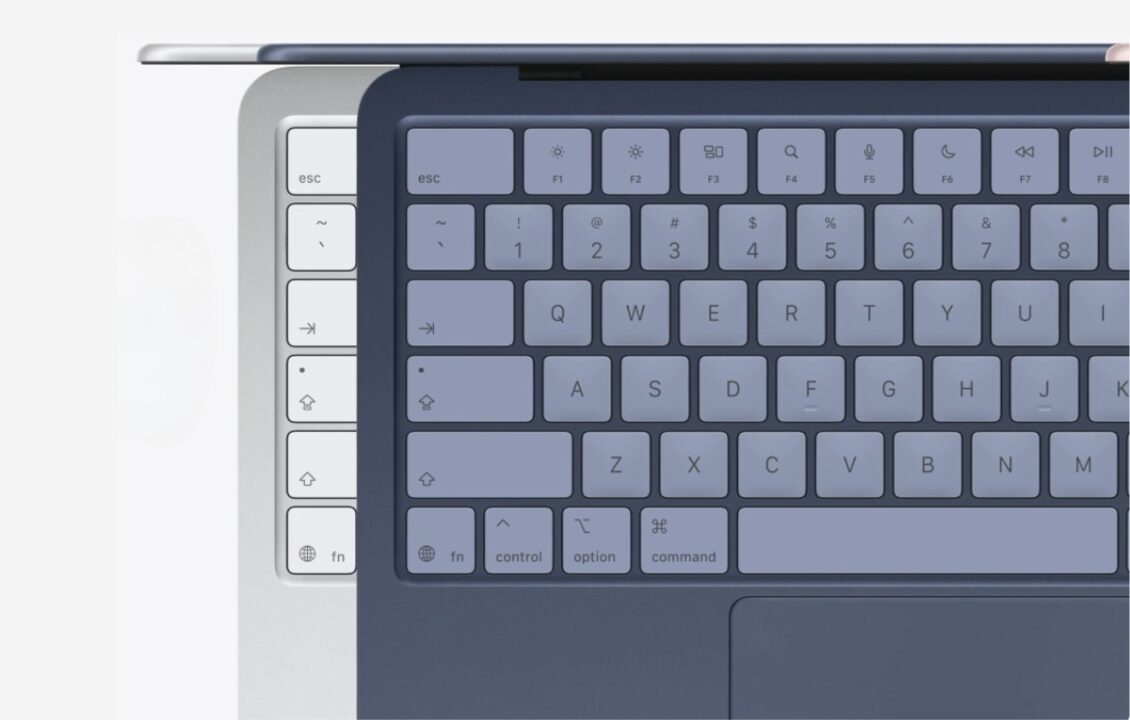
In a noticeable step backward, the MacBook Neo regresses in terms of the typing experience, completely lacking keyboard backlighting—a feature that has become essential for many users in low-light conditions. Furthermore, the base model does not include the Touch ID fingerprint sensor, eliminating the security and quick access feature found in other models.
2. Forgoing Force Touch on the Trackpad
Unlike modern Mac devices that utilize the advanced Force Touch trackpad, the MacBook Neo relies on a traditional trackpad that supports multi-finger gestures but lacks the precise haptic feedback generated by the Taptic Engine. This means functionality dependent on deep pressure, such as quick file previews or accessing secondary context menus, will be missing.
3. Display Lacking True Tone Technology
The screen features a basic resolution but omits two significant features: the first is the absence of an ambient light sensor, forcing the user to manually adjust brightness constantly. The second is the lack of support for True Tone technology, which normally adjusts the screen's color temperature to match ambient lighting, thereby enhancing visual comfort during long usage periods.

4. Limitations on USB-C Ports and Absence of Thunderbolt
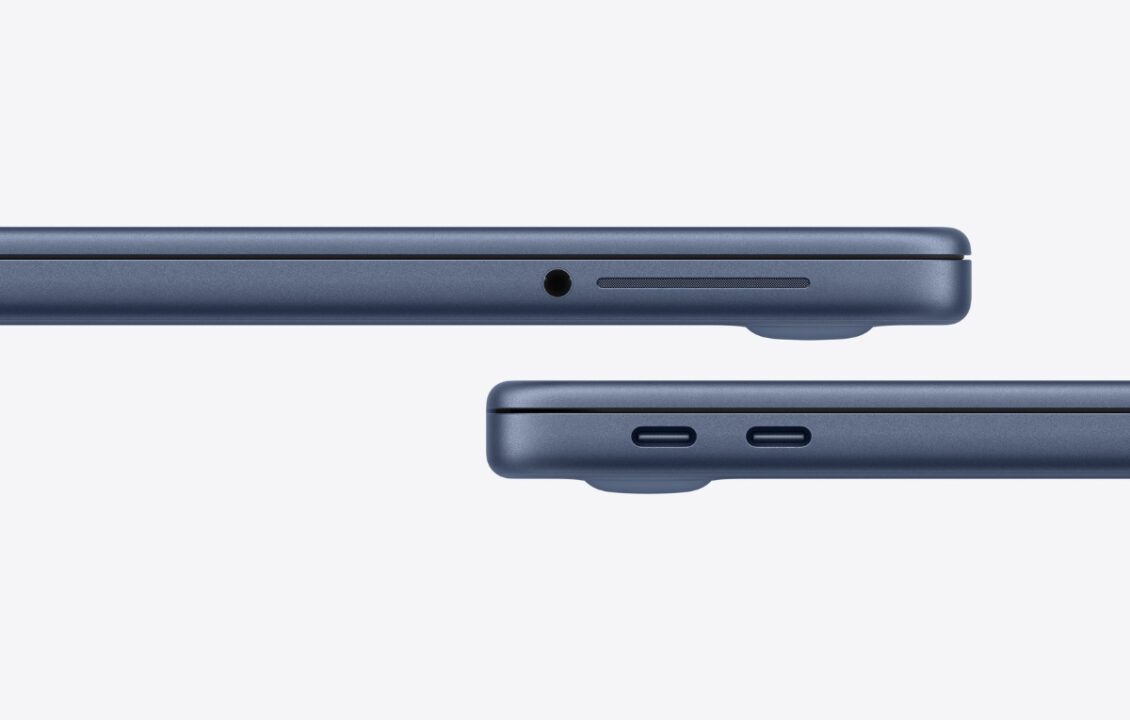
The device includes two USB-C ports, but the limitation here is that neither supports Thunderbolt technology, which is essential for achieving the fastest data transfer speeds and connecting professional peripherals. One port operates on the standard USB 3 specification (10Gbps), while the other runs at a very slow USB 2 speed. Charging also consumes one of these ports due to the lack of a dedicated MagSafe connector.
5. Slower Charging and Potential Lack of Included Charger
The device comes with a 20W charger, meaning charging speed is significantly slower compared to higher-end models supporting fast charging. More concerningly, Apple has opted not to include the charger in the box in certain markets (like the EU) in line with sustainability goals, forcing the buyer to purchase a compatible adapter separately.
6. Modest Camera and Display Specifications
The 13-inch display features thicker bezels compared to modern designs and lacks support for the P3 wide color gamut, which affects the vibrancy of displayed colors. Although the camera is rated at 1080p, it does not support Center Stage functionality, which ensures the user remains framed during video calls—a feature that has become standard on other Apple devices.

7. Basic Stereo Sound System
Instead of investing in advanced surround sound technology, Apple opted for a simple stereo sound system in the MacBook Neo. This system provides less depth and richness in audio quality and its performance can be easily affected when the device is placed on soft surfaces or used on one's lap, reducing the quality of the auditory experience.
Is the MacBook Neo a Strategic Choice for the Buyer?
Considering these trade-offs, it becomes clear that the MacBook Neo is clearly aimed at fundamental tasks: browsing, basic office work, light study, and simple entertainment. It offers a fantastic opportunity to enter the macOS ecosystem at an unmatched price, provided the user is prepared to forgo the premium features found in higher-priced models.
What are the fundamental differences between the $600 and $700 versions?
The core difference lies in storage capacity; the cheaper version comes with 256GB of storage and 8GB of RAM without the fingerprint sensor. The $700 version doubles the storage to 512GB and adds the security feature of the Touch ID sensor.
Can the MacBook Neo be relied upon for professional video editing and design work?
This device is not recommended for professionals in fields like high-definition video editing or intensive graphic design. The limitations imposed by port speeds (lack of Thunderbolt) and the absence of wide color support on the display make it inefficient compared to MacBook Pro models designed for such tasks.
Does the device support external display connections?
Yes, an external monitor can be connected via one of the USB-C ports. However, it is important to note that the absence of Thunderbolt technology means the user might face limitations on display resolution or refresh rate, potentially requiring less efficient adapters than those used with Thunderbolt-supporting devices.
Why did Apple decide to remove the charger from the box in some regions?
This decision stems from Apple's commitment to adhering to strict environmental regulations in regions like the European Union and the UK. The company aims to reduce its carbon footprint and electronic waste, operating under the assumption that most buyers already possess compatible USB-C cables and chargers.
⚓🕳️✨ In conclusion, the MacBook Neo represents an excellent and calculated entry platform into the Apple ecosystem, but its success is entirely dependent on your acceptance of the listed trade-offs. If your priorities are budget and battery life, coupled with an acceptance of giving up 'luxury' features like keyboard backlighting and Thunderbolt support, then it offers unmatched value in its price segment.
Post a Comment