
Samsung One UI 9: A Closer Look at the Redesigned Lock Screen Media Player
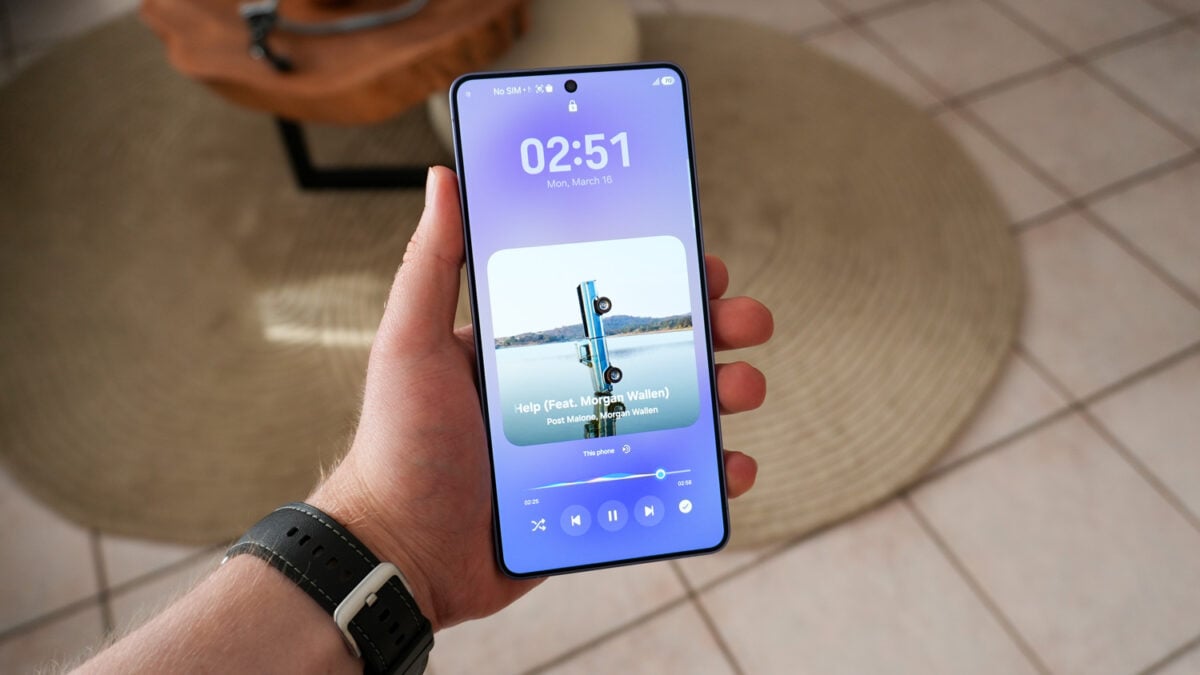
Fresh leaks from the initial internal builds of One UI 9 have surfaced, providing a glimpse into how Samsung is refining the user experience for its next generation of devices. While the software is still in its early stages, particularly for the Galaxy S26 Ultra, the updates suggest a focus on aesthetic fluidity and functional accessibility. One of the most striking changes discovered so far is a complete visual overhaul of the lock screen media player widget, making it more dynamic than ever before.
- ✨ Introduces vibrant, colorful waveform graphics on the media progress bar.
- ✨ Features a new "This Phone" option for quick access to casting and smart devices.
- ✨ Redesigns playback controls into sleek circular buttons for a modern look.
- ✨ Overlays track metadata directly onto the album art for better space utilization.
Enhanced Visuals and Dynamic Waveforms
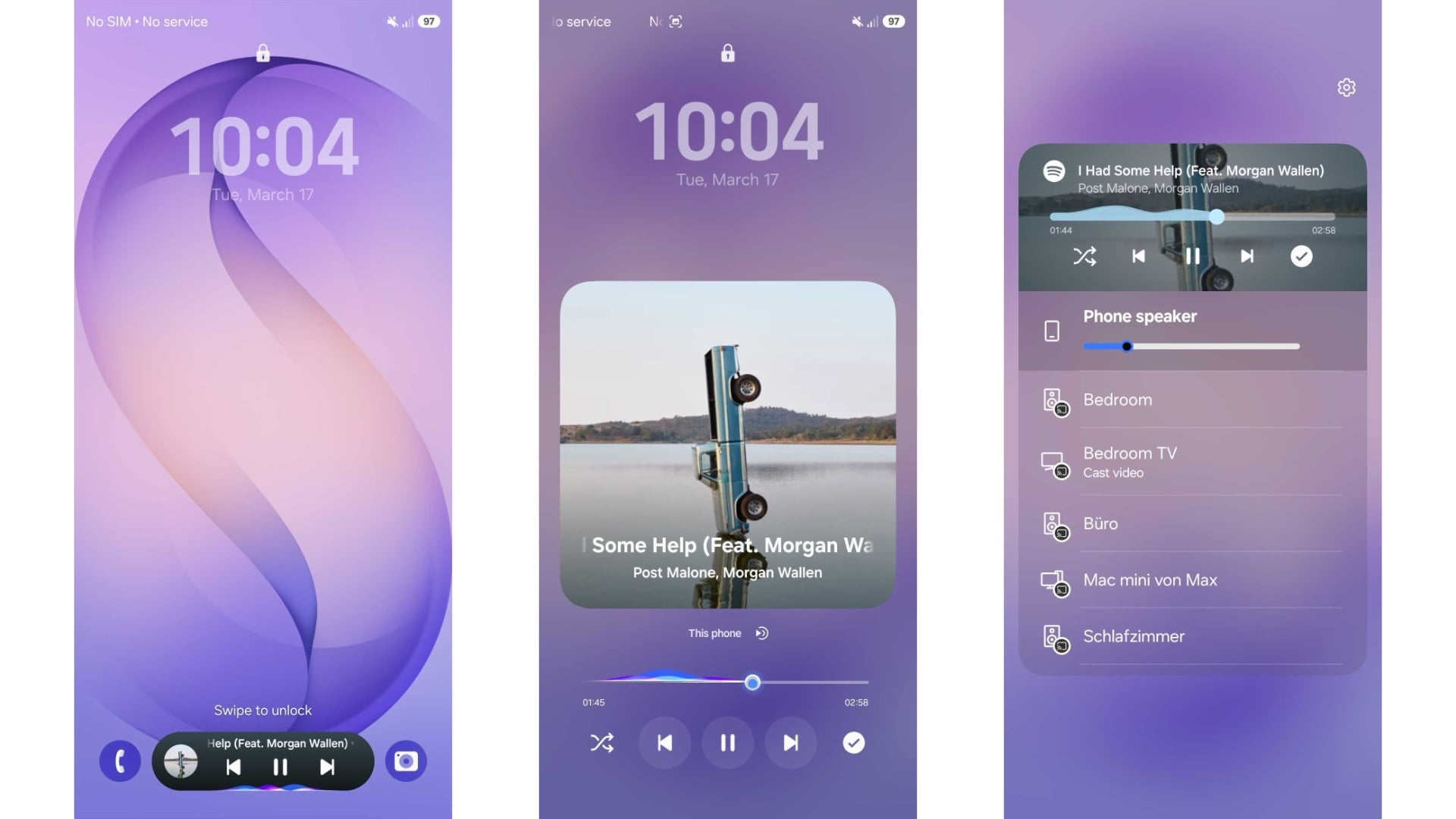
In One UI 9, the media player widget on the lock screen has been spruced up with more colorful waveform graphics that dance across the progress bar. This visual flair isn't limited to the lock screen; similar animations now appear at the bottom of the "Now Bar" widget during active music playback. This adds a layer of modern sophistication that was missing in previous iterations of Samsung software.
Functionality has also taken a step forward. Positioned just below the album art is a new option labeled "This Phone." By tapping this, users can instantly see available casting options. This includes Google Cast-compatible smart speakers and TVs, as well as Alexa-integrated devices, depending on which music or media app is currently in use. This replaces the older "Media Output" label found in One UI 8.5, streamlining the process of moving audio from your phone to your home ecosystem.
Modernized Controls and Layout
The layout of the playback controls has undergone a significant transformation. Key music controls—specifically the previous track, play/pause, and next track functions—are now housed within distinct circular buttons. Interestingly, secondary controls like shuffle or the Spotify download shortcut remain without circular containers, creating a visual hierarchy that emphasizes primary actions.
Furthermore, Samsung has changed how song information is presented. The track title, artist name, and album details are now elegantly overlaid on top of the album art. This is a departure from the traditional layout where this information occupied space below the image, resulting in a more compact and immersive widget design.
One UI 9 vs. One UI 8.5: What Has Changed?
When compared to One UI 8.5, which recently launched with the Galaxy S26 series, the differences are subtle but impactful. One UI 8.5 typically groups its media controls inside a standard rectangular container with rounded corners. It lacks the vibrant waveform graphics on the lock screen and uses the "Media Output" terminology for device switching. By moving toward the "This Phone" branding and circular aesthetics, One UI 9 feels like a more cohesive evolution of Samsung's design language.
What are the main visual updates in the One UI 9 media player?
The most notable visual updates include the addition of colorful waveform graphics on the progress bar and the use of circular buttons for primary playback controls like play, pause, and skip.
How does the "This Phone" button function?
The "This Phone" button replaces the "Media Output" option. When tapped, it opens a menu showing available casting devices, such as smart TVs and speakers compatible with Google Cast or Alexa.
Is the song information displayed differently in the new update?
Yes, in One UI 9, the track title, artist, and album information are overlaid directly on the album art, whereas in previous versions, this text was typically displayed below the image.
Will these changes be available on older Galaxy devices?
While these features are currently seen in internal builds for the Galaxy S26 Ultra, Samsung typically rolls out One UI updates to a wide range of recent flagship and mid-range devices once the official version is released.
🔎 As Samsung continues to develop One UI 9, these early leaks suggest a commitment to making the interface more engaging and user-friendly. The revamped lock screen media player is a perfect example of how small design tweaks can significantly enhance the daily interaction with a smartphone. While we are still months away from a public beta, the direction Samsung is taking with these colorful and circular design elements points toward a very polished final product.
Post a Comment