
Samsung QuickStar Update: Why Are the Promised One UI 8.5 Features Still Missing?
Samsung has officially started rolling out a new update for QuickStar, one of its most popular Good Lock modules. While users were eagerly anticipating a suite of transformative features previously teased by the tech giant, this latest release, carrying version 10.0.01.3, appears to be a more incremental step than a major overhaul. The update focuses on reintroducing specific layout options and enhancing the overall stability of the interface.
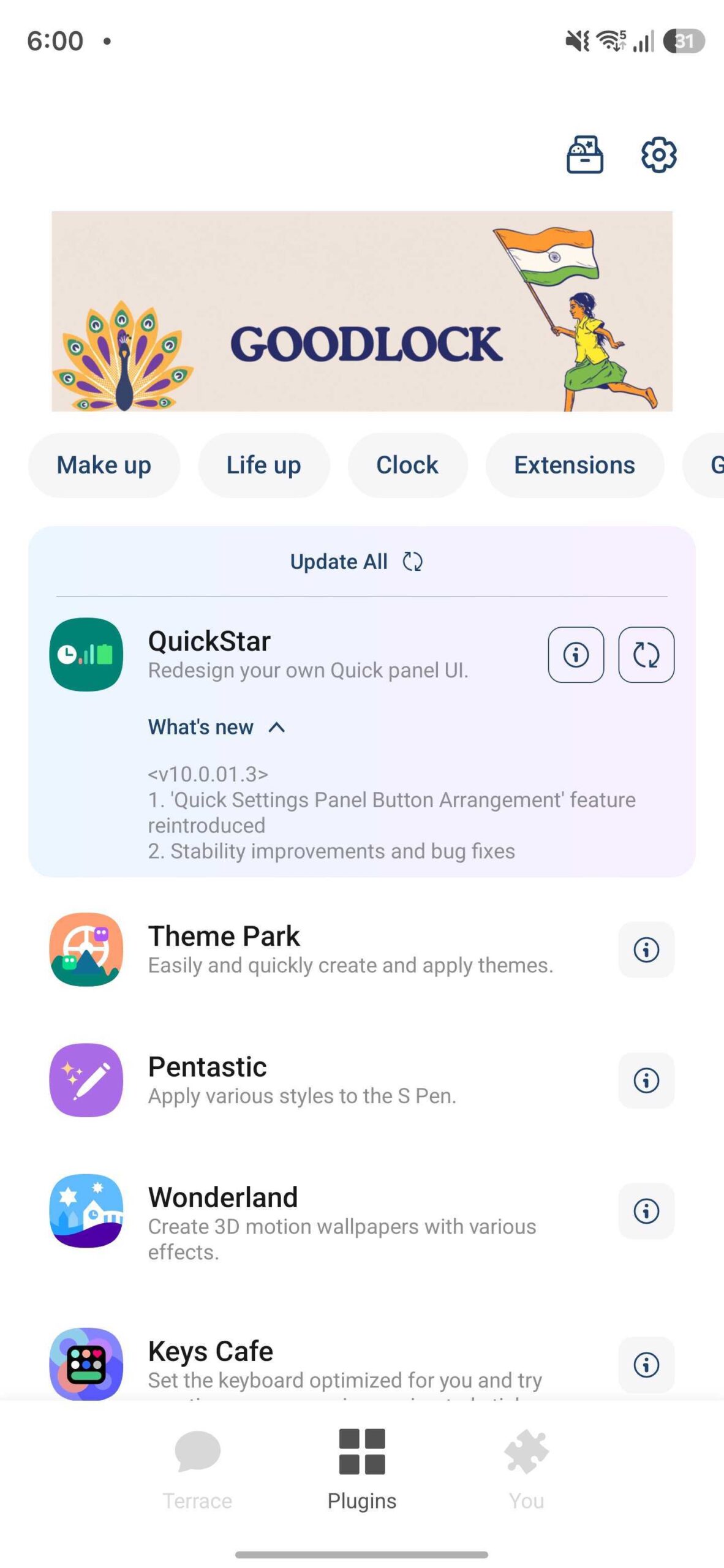
- ✨ QuickStar version 10.0.01.3 officially reintroduces the "Quick Settings Panel Button Arrangement" feature.
- ✨ The update includes critical stability improvements and bug fixes for Samsung Galaxy devices.
- ✨ Highly anticipated One UI 8.5 features, such as custom toggle backgrounds, are currently absent.
- ✨ Users can download the update via the Galaxy Store or directly through the Good Lock plugin menu.
What is New in QuickStar Version 10.0.01.3?
According to the official changelog provided by Samsung, the primary highlight of this update is the return of the "Quick Settings Panel Button Arrangement." This feature allows users to fine-tune how their toggles are displayed, offering a more personalized experience for those who frequently use the notification shade. Beyond this functional reintroduction, the update is largely focused on "under-the-hood" refinements, targeting better performance and resolving minor glitches that users had reported in previous builds.
To ensure your device is running the latest version, you can open the Good Lock app, navigate to the Plugins section, locate QuickStar, and tap the update icon. Alternatively, you can visit the Galaxy Store, access the "Updates" section from the side menu, and refresh your app list. For a direct link to the store page, you can follow the button below:

The Missing One UI 8.5 Features
The disappointment among power users stems from an announcement made earlier this year. Samsung had promised significant upgrades for various Good Lock modules to coincide with the release of One UI 8.5 (based on Android 16 QPR2). Specifically for QuickStar, fans were expecting the ability to set unique background images for individual quick setting toggles, enhanced editing capabilities for the panel in landscape mode, and the freedom to change toggle orientations.
Despite the One UI 8.5 update debuting recently with the flagship Galaxy S26 series, these specific customization features have not yet materialized in the QuickStar app. This suggests that while the platform is ready, the specific module updates might require more development time before they are stable enough for a public release.
How do I update the QuickStar module on my Samsung phone?
You can update QuickStar by opening the Good Lock app and tapping the update icon next to the module name. Alternatively, go to the Galaxy Store, tap the menu (three horizontal lines), select "Updates," and look for QuickStar in the list.
What is the "Quick Settings Panel Button Arrangement" feature?
This feature allows users to customize the grid and layout of the buttons in the notification shade, making it easier to organzie and access frequently used settings like Wi-Fi, Bluetooth, and Flashlight.
Why aren't the new One UI 8.5 features showing up in my QuickStar app?
Although Samsung announced features like custom toggle backgrounds and landscape editing for One UI 8.5, they were not included in this specific version (10.0.01.3). It is likely that Samsung will release another update in the near future to enable these advanced tools.
Is this update compatible with all Samsung devices?
QuickStar is compatible with most modern Samsung Galaxy devices that support the Good Lock suite. However, specific features may vary depending on your device's current One UI version and hardware capabilities.
🔎 While this latest QuickStar update might feel like a missed opportunity for those waiting on the "big" One UI 8.5 features, the reintroduction of button arrangement options and improved stability are still welcome changes. Samsung has a history of rolling out Good Lock features in waves, so it is highly probable that the more advanced customization tools are just around the corner. For now, ensuring your module is updated to version 10.0.01.3 will provide the smoothest experience on your Galaxy device.
Post a Comment