
Essential Google Update Required to Keep Your Samsung Wallet Fully Functional
Samsung Wallet has evolved into an indispensable tool for Galaxy users, streamlining everything from daily payments to digital security. As one of the most comprehensive digital wallet solutions available today, it integrates deeply with the Android ecosystem to provide a seamless user experience. However, a recent discovery highlights that certain advanced features, specifically those related to security and digital access, are strictly dependent on the underlying Google infrastructure. Without a specific update, your digital keys might suddenly stop working.
- ✨ Samsung Wallet's Digital Key feature now requires the latest version of Google Play Services.
- ✨ Failure to update may prevent users from locking or unlocking smart home locks and vehicles.
- ✨ While updates are usually automatic, manual checks are recommended for immediate functionality.
- ✨ Samsung Wallet continues to expand its support for passkeys, IDs, and crypto assets.
Why Google Play Services is Critical for Your Digital Keys
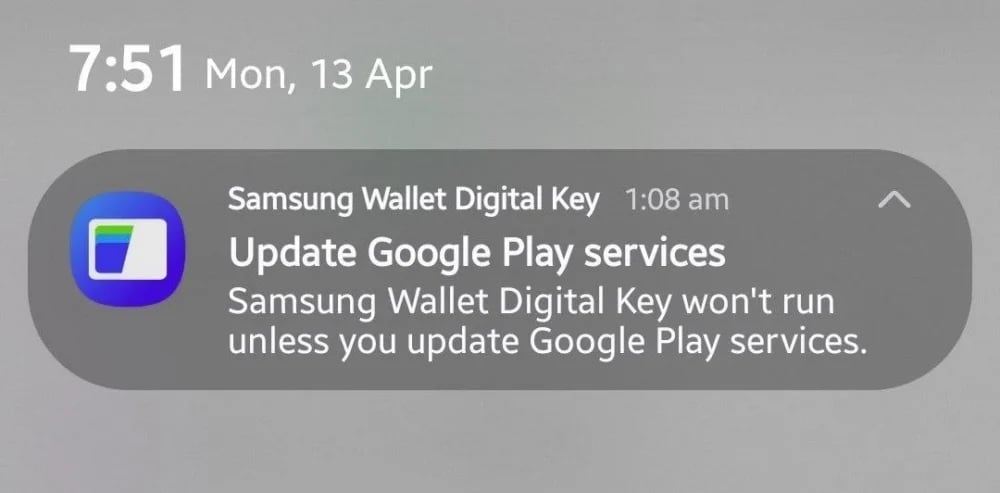
Recent reports indicate that Galaxy users are receiving notifications regarding a mandatory update for Google Play Services. This component acts as the bridge between your hardware and the software features provided by Google and Samsung. Specifically, the Digital Key feature within Samsung Pay and Wallet relies on these background services to communicate securely with encrypted hardware like smart car locks and home security systems.
If your system is running an outdated version of these services, you might find yourself unable to access your vehicle or home via your smartphone. This dependency underscores the collaborative nature of the One UI ecosystem, where Samsung's interface must work in perfect harmony with Google's core Android components to maintain high-level security standards.
How to Manually Update and Restore Functionality
When the notification appears, tapping it will typically redirect you to the Google Play Store to download the necessary patch. However, if you haven't seen the alert but are experiencing issues with your digital keys, you can perform a manual check. Navigate to Settings > Google > All services > System services > Google Play services, and then select Update to ensure you are on the latest build.
Samsung Wallet is designed to be a "one-stop shop" for all your digital needs. It comes pre-installed on most modern Galaxy devices and supports an extensive array of items, ensuring that your physical wallet can truly stay at home. These features include:
- App and website login credentials, including modern passkeys.
- Boarding passes and travel tickets for major airlines.
- Standard credit and debit cards for contactless payments.
- Cryptocurrency holdings and NFT collections.
- Digital keys for compatible smart homes and vehicles.
- Government-approved digital ID cards and driver’s licenses.
- Loyalty programs and membership cards for various retailers.
What happens if I don't update Google Play Services?
If you skip this update, the Digital Key feature in Samsung Wallet may fail. This means you won't be able to use your phone to unlock your car or enter your home if you rely on compatible smart locks. Other payment features might continue to work, but the specialized security handshake required for digital keys will be disabled.
Is this update automatic on Galaxy phones?
Generally, Google Play Services updates automatically in the background. However, due to battery optimization settings or network restrictions, these updates can sometimes lag behind. It is always best to check manually if you receive a warning notification from the Samsung Wallet app.
Does this affect all Samsung Wallet features?
The primary impact is on the Digital Key functionality. Standard credit card payments, loyalty cards, and boarding passes are less likely to be affected immediately, but keeping core Google components updated is essential for the overall security and stability of the entire Wallet application.
How do I know if my Digital Key is compatible?
Samsung Wallet supports digital keys for various car brands like BMW, Genesis, and Audi, as well as smart locks that use the Aliro standard. You can check compatibility within the "Keys" section of your Samsung Wallet app to see if your specific vehicle or home lock is supported.
🔎 Staying updated with the latest software components is no longer just about getting new features; it is a fundamental requirement for maintaining the security and utility of your digital life. As Samsung continues to integrate more "real-world" access into its Wallet app, the reliance on background services like Google Play Services will only grow. By ensuring your device is running the latest version, you guarantee that your digital keys remain as reliable as their physical counterparts, providing peace of mind every time you leave the house.
Post a Comment