
How to Use Google Photos on Samsung Smart TVs: Features and Compatibility Guide
Samsung has officially expanded its ecosystem by integrating Google Photos into its smart TV lineup, marking a significant shift for users who previously relied on OneDrive for cloud media synchronization. This new collaboration allows users to access their vast libraries of memories directly from their living room screens, offering a more integrated and visually stunning way to relive past moments. As the 2026 Samsung TV models begin to hit the global market, this feature is now live, bringing a suite of new tools designed specifically for the big-screen experience.
- ✨ Google Photos support is now officially available on all 2026 Samsung TV models.
- ✨ Users can view high-quality photos and videos directly through the Daily+ integration.
- ✨ Advanced privacy settings allow for hiding specific people, pets, or dates from the TV display.
- ✨ The AI-powered "Now Brief" feature provides personalized memory recommendations.
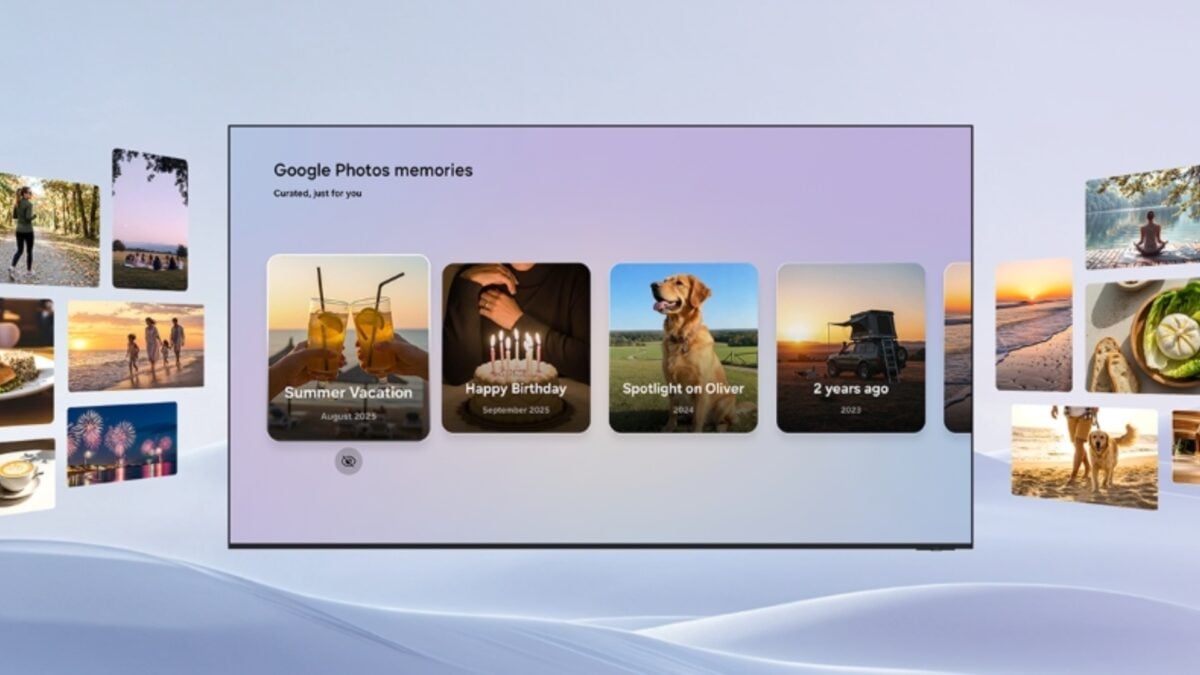
Seamless Integration via Daily+ and Now Brief
The integration of Google Photos into the Samsung Smart TV interface is handled through the Daily+ ecosystem. Users can access their content via the Daily+ row on the home screen, a dedicated app launcher, or the Now Brief widget. This ensures that your favorite photos are never more than a few clicks away. The experience is optimized for large displays, ensuring that high-resolution images look crisp and vibrant, particularly on high-end Neo QLED and OLED panels.
One of the standout additions is the "Now Brief" feature. Originally debuted with the Galaxy S25 series, this AI-driven tool analyzes your library to suggest relevant photos and videos, encouraging a nostalgic trip down memory lane. Using the TV's remote, viewers can easily navigate through these curated highlights, pausing on favorite moments or skipping through others with ease.
Privacy Controls and Setup Process
Samsung and Google have prioritized user privacy in this layout. When setting up the service, a QR code appears on the TV screen. By scanning this with a smartphone, users can precisely select which memories are shared with the television. This includes the ability to "Hide" specific individuals, pets, or timeframes, ensuring that sensitive or private content remains off the communal screen. If an unwanted image does appear, a dedicated "Hide" option is available directly within the TV interface for immediate removal.
While the feature is currently exclusive to the 2026 lineup, there is significant speculation regarding whether a software update will bring this functionality to older Tizen-based models. For owners of "The Frame" series, this integration is particularly exciting, as it allows personal photography to be displayed with the same artistic flair as professional gallery pieces
Which Samsung TV models currently support Google Photos?
As of now, the Google Photos integration is officially available only on Samsung Smart TVs launched in 2026. Samsung has not yet confirmed if this feature will be backported to 2025 or older models via a firmware update.
How do I link my Google account to my Samsung TV?
The process is simplified via a QR code displayed on the TV. You scan the code with your mobile device, log in to your Google account, and grant the necessary permissions to display your library on the Tizen OS interface.
Can I control which photos are visible to others in the house?
Yes, the integration includes robust privacy filters. You can choose to exclude specific people, pets, or dates from appearing in the highlights and "Now Brief" sections directly from your mobile setup screen.
Does this replace the previous OneDrive integration?
Yes, Samsung has transitioned away from OneDrive for TV media synchronization, positioning Google Photos as the primary cloud gallery service for its latest hardware.
Will videos play automatically in the Daily+ row?
The Daily+ row features a curated selection of both photos and videos. While photos rotate, videos can be played in full-screen mode for a more immersive viewing experience via the app launcher.
🔎 The arrival of Google Photos on Samsung TVs represents a major win for users who want their digital lives to feel more connected across devices. By leveraging AI recommendations and deep integration into the Tizen interface, Samsung has turned the television into a dynamic digital canvas. Whether you are using "The Frame" to display family portraits or a Neo QLED to watch high-definition home videos, this update ensures your memories are always front and center in the highest quality possible.
Post a Comment