
Samsung Members App Update: First Look at the Stunning One UI 8.5 Floating Design
Samsung is pushing the boundaries of its software aesthetics once again, bringing a fresh look to its core ecosystem. As the tech world anticipates the full rollout of the latest software versions, the Samsung Galaxy experience is already evolving through individual app updates. The latest recipient of this visual overhaul is the Samsung Members app, which serves as the primary hub for community interaction, support, and device diagnostics for millions of users worldwide.
- ✨ Introduction of the modern One UI 8.5 floating bottom bar design.
- ✨ Version 5.8.00.10 specifically optimized for Android 16 QPR2.
- ✨ Seamless navigation overhaul for Discover, Community, and Support tabs.
- ✨ Global rollout initiated via the official Galaxy Store.
Modernizing Navigation with One UI 8.5 Elements
Samsung has officially released a significant update for the Samsung Members app. This latest iteration, carrying version number 5.8.00.10, is currently being deployed to devices running on One UI 8.5 (based on Android 16 QPR2). While the official changelog remains brief, the visual impact of the update is immediately apparent to anyone who installs it.
The most striking change is the transition from a traditional navigation structure to a more dynamic interface. In previous versions, the Samsung Members app utilized a standard flat bar at the bottom of the screen to host the Discover, Community, and Support tabs. This design, while functional, felt increasingly dated compared to the newer design philosophies Samsung is adopting for its next-generation software.
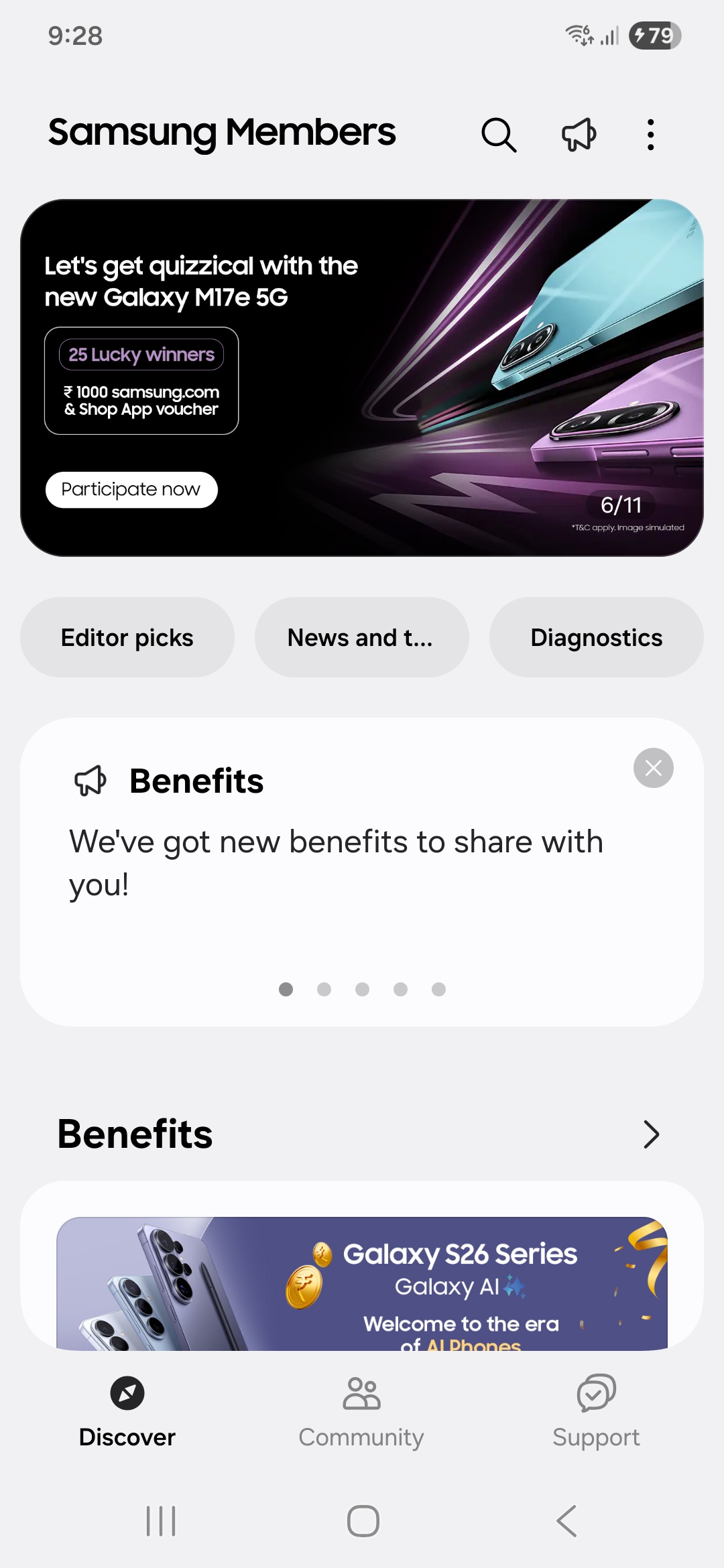
The Legacy Look: The previous flat bottom bar design used in One UI 8.0.
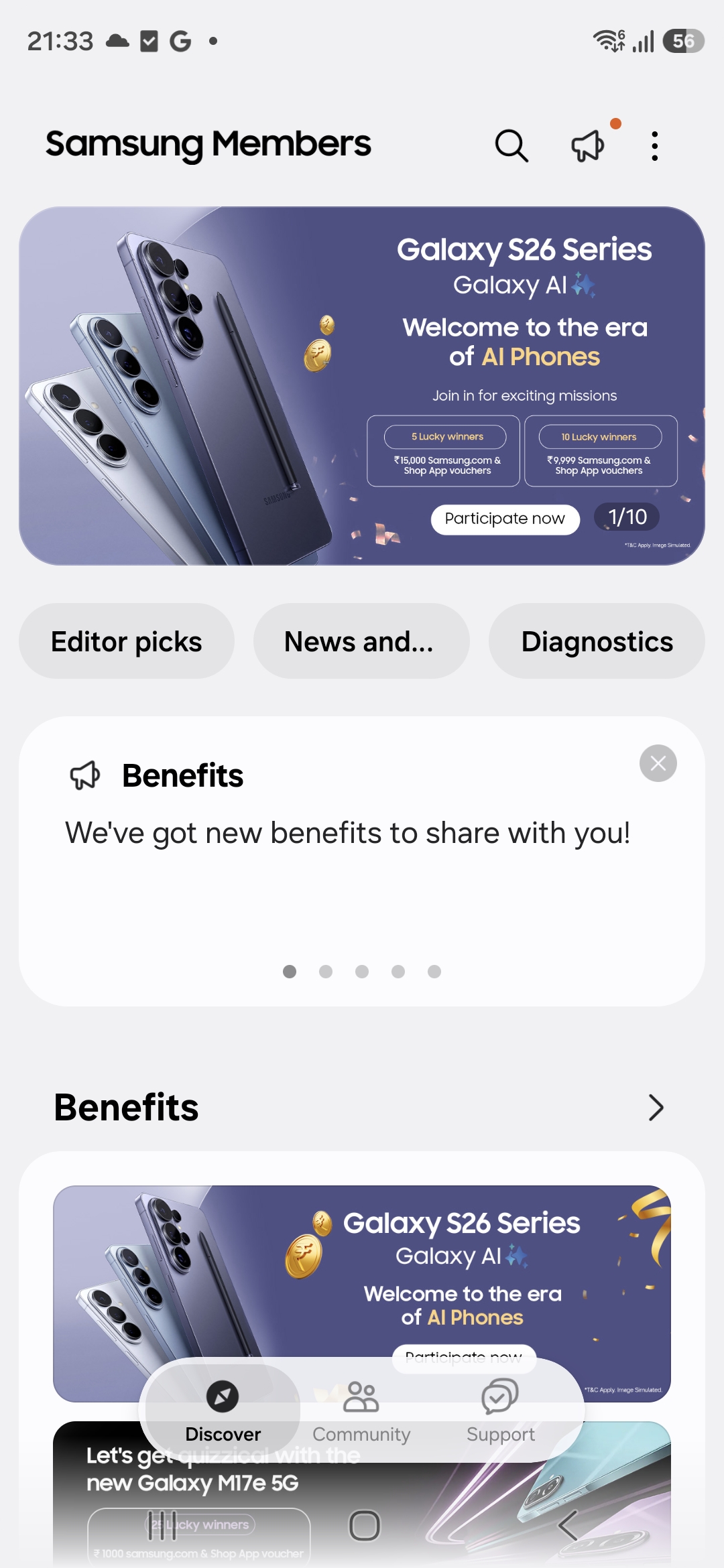
The Modern Look: The new floating navigation bar introduced with One UI 8.5.
A Floating Experience for Better Usability
The new version of the app features a "floating" bottom bar that sits elegantly above the main content. This design choice is a signature element of the Samsung Members evolution within the One UI 8.5 ecosystem. By detaching the navigation bar from the bottom edge of the screen, the interface gains a sense of depth and fluidity, making the app feel more integrated with the overall system software.
This rollout appears to be global, reaching users across various regions who have already transitioned to the latest beta or stable builds of the new OS. For those eager to try the new look, the update process is straightforward. Users should open the Galaxy Store, access the menu via the hamburger icon, select Updates, and check for the latest version of the Members app.
Samsung’s strategy involves a slow but steady update cycle for its first-party applications. While the Members app is among the first to showcase these One UI 8.5 design languages, it is expected that other core apps like Gallery, Calendar, and Notes will follow suit in the coming months, creating a unified and modern aesthetic across the entire Galaxy lineup.
What is the main change in the Samsung Members 5.8.00.10 update?
The primary highlight of this update is the introduction of a floating bottom navigation bar, replacing the old flat design. This change aligns the app with the new design language found in the upcoming One UI 8.5 software.
Which devices are eligible for this specific app update?
Currently, the update is being rolled out specifically for Galaxy smartphones and tablets that are running on One UI 8.5, which is based on Android 16 QPR2.
How can I download the latest version of Samsung Members?
You can update the app by visiting the Galaxy Store. Tap on the menu icon, navigate to the 'Updates' section, and look for Samsung Members in the list of available updates.
Will other Samsung apps receive this floating design?
Yes, Samsung is expected to gradually update its entire suite of first-party applications to match the One UI 8.5 design language over the next few months.
🔎 This update marks another step in Samsung's journey toward a more refined and visually cohesive user interface. By focusing on even the smallest details—like the way a navigation bar sits on the screen—Samsung ensures that the Galaxy experience remains premium and modern. As One UI 8.5 continues to reach more users, we can expect the entire app ecosystem to transform, providing a smoother and more aesthetically pleasing experience for Galaxy fans worldwide.
Post a Comment