
Samsung Galaxy A16 5G One UI 8.5 Update: New Features and Enhancements Explained
Samsung has officially begun rolling out the feature-packed One UI 8.5 update for the Galaxy A16 5G, marking a significant milestone for this entry-level device. This latest software iteration doesn't just bump up the version number; it introduces a more refined user interface, enhanced system performance, and a suite of new tools designed to improve the daily user experience. The update is currently making its way to users in major markets, signaling Samsung's commitment to providing long-term support even for its more affordable smartphones.
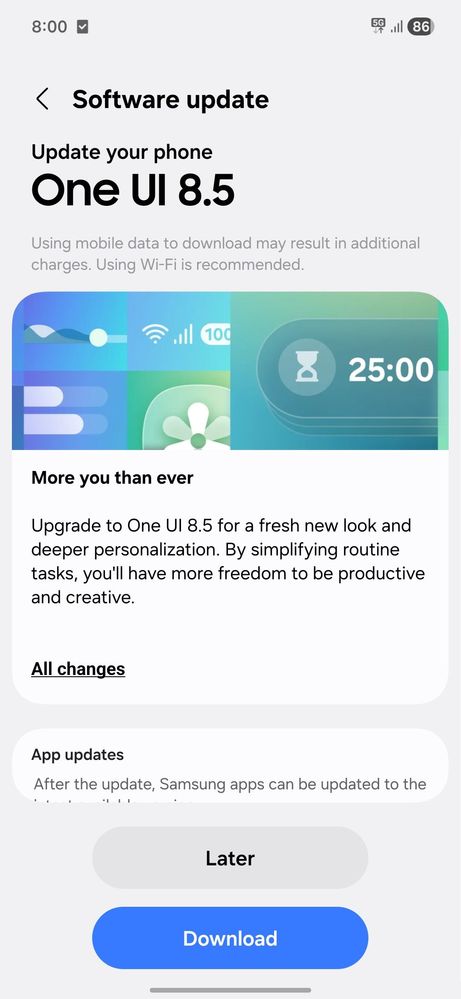
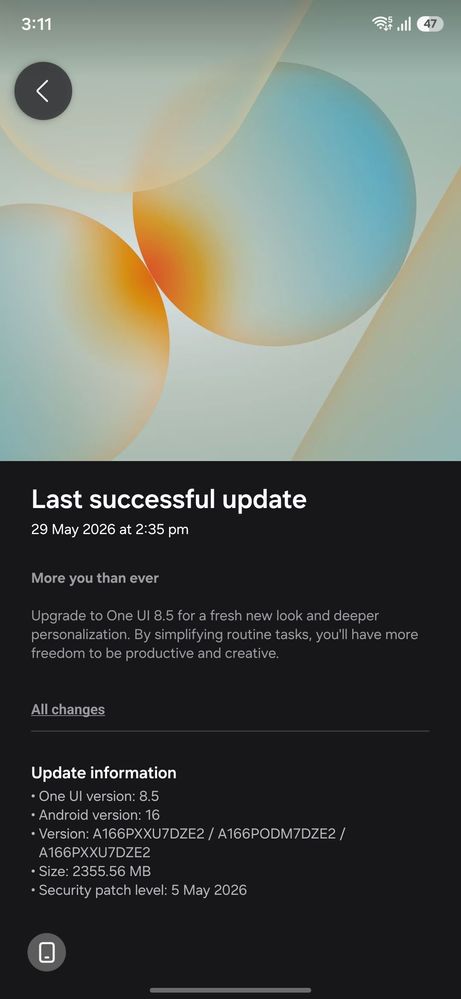
- ✨ Firmware version A166PXXU7DZE2 is now rolling out with a download size of approximately 2.3GB.
- ✨ Includes the May 2026 security patch for enhanced device protection.
- ✨ Features a refreshed UI design with improved transparency, blur effects, and a customizable Quick Panel.
- ✨ New productivity tools added to Samsung Notes, Calculator, and the Weather app.
- ✨ Enhanced security with Theft Protection and temporary Auto Blocker disabling options.
If you are a Samsung Galaxy A16 5G owner residing in India or Indonesia, the wait is over. The update, identified by firmware version A166PXXU7DZE2, is a substantial download at 2.3GB. In addition to the new features, it bundles the May 2026 security patch, which addresses several vulnerabilities to keep your data safe. To check for the update, simply navigate to Settings, select Software update, and tap Download and install. It is highly recommended to have at least 30% battery life and a stable Wi-Fi connection before initiating the process.
What is New in One UI 8.5 for the Galaxy A16 5G?
One UI 8.5 brings a breath of fresh air to the visual department. Users will notice a more modern aesthetic characterized by enhanced transparency and sophisticated blur effects throughout the system. The Quick Panel is now fully customizable, allowing you to prioritize the toggles you use most. Furthermore, the lock screen has received significant attention with new clock font options and automatic layouts that adapt to your wallpaper. Samsung has even included a fresh batch of downloadable wallpapers to help you personalize your device further.
Productivity and App Enhancements
Beyond aesthetics, the software update improves several core applications. The Weather app now includes a pollen index and dynamic weather effects for alarm backgrounds, making your morning wake-up call more informative. For those who frequently travel or work across borders, the Clock app now features a built-in time zone converter. Direct Voicemail has also been integrated for smoother communication management. Additionally, users can now create shortcuts for wireless display devices, making screen mirroring faster than ever.
Samsung Health and Device Care haven't been left behind. Health enthusiasts can now share workout statistics more easily and initiate antioxidant measurements or meditation sessions directly from their Galaxy Watch. The Device Care section now offers granular battery usage data, helping you identify power-hungry apps. Samsung Internet also sees an upgrade with an improved New Tab page that can sync and display open tabs from your other Galaxy devices, ensuring a seamless browsing transition across the Samsung ecosystem.
Security and utility are also front and center in this release. One UI 8.5 introduces Theft Protection and the option to temporarily disable Auto Blocker for advanced users. Productivity gets a boost with support for tables in Samsung Notes and proactive calculation suggestions in the Calculator app based on clipboard content. These small but meaningful changes make the Galaxy A16 5G a much more capable tool for work and play.
What is the download size of the One UI 8.5 update for the Galaxy A16 5G?
The update is quite large, requiring approximately 2.3GB of storage space. It is best to download it over a stable Wi-Fi connection.
Which regions are currently receiving the One UI 8.5 update?
The rollout has officially started in India and Indonesia. Other regions are expected to follow in the coming weeks.
Does this update include a new security patch?
Yes, the update includes the May 2026 security patch, which improves the overall security and stability of the device.
What are the major UI changes in this version?
Users will see a refreshed design with more transparency and blur effects, a customizable Quick Panel, and new lock screen fonts and layout options.
Are there any new safety features included?
Yes, Samsung has added Theft Protection and the ability to temporarily disable the Auto Blocker feature for more flexibility.
How can I install the update on my device?
Go to Settings > Software update > Download and install. Ensure your phone has at least 30% battery before starting the installation.
🔎 The One UI 8.5 update for the Galaxy A16 5G represents a significant leap forward for Samsung's entry-level lineup. By bringing modern UI elements, improved app functionality, and robust security features to the A16 5G, Samsung ensures that its users enjoy a premium software experience regardless of their device's price point. If you haven't received the notification yet, keep checking your settings, as the rollout is expanding to more users every day.
Post a Comment