
Samsung One UI 8.5 Update: How to Enable the New Dim Strobing Accessibility Feature
Samsung has taken a significant step forward in digital inclusivity with its latest software release. The One UI 8.5 firmware update introduces several enhancements designed to make the user experience safer and more comfortable. Among these is a vital new accessibility feature specifically tailored for users who experience discomfort or medical issues when exposed to flashing lights. This tool aims to mitigate the risks associated with photosensitive triggers in digital content, ensuring that the Samsung Galaxy ecosystem remains accessible to everyone.
Quick Insight: The One UI 8.5 update adds a "Dim Strobing" toggle that automatically detects and reduces the intensity of flashing lights in videos. This feature is a game-changer for users with photosensitivity, providing a more comfortable viewing experience across supported applications.
- ✨ New "Dim Strobing" feature helps users sensitive to flashing lights.
- ✨ Automatically reduces brightness during strobing video effects.
- ✨ Found deep within the Vision Enhancements menu.
- ✨ Operates on a per-device basis without ecosystem syncing.
- ✨ Enhances overall eye comfort for Galaxy phone users.
How to Protect Your Eyes with Dim Strobing
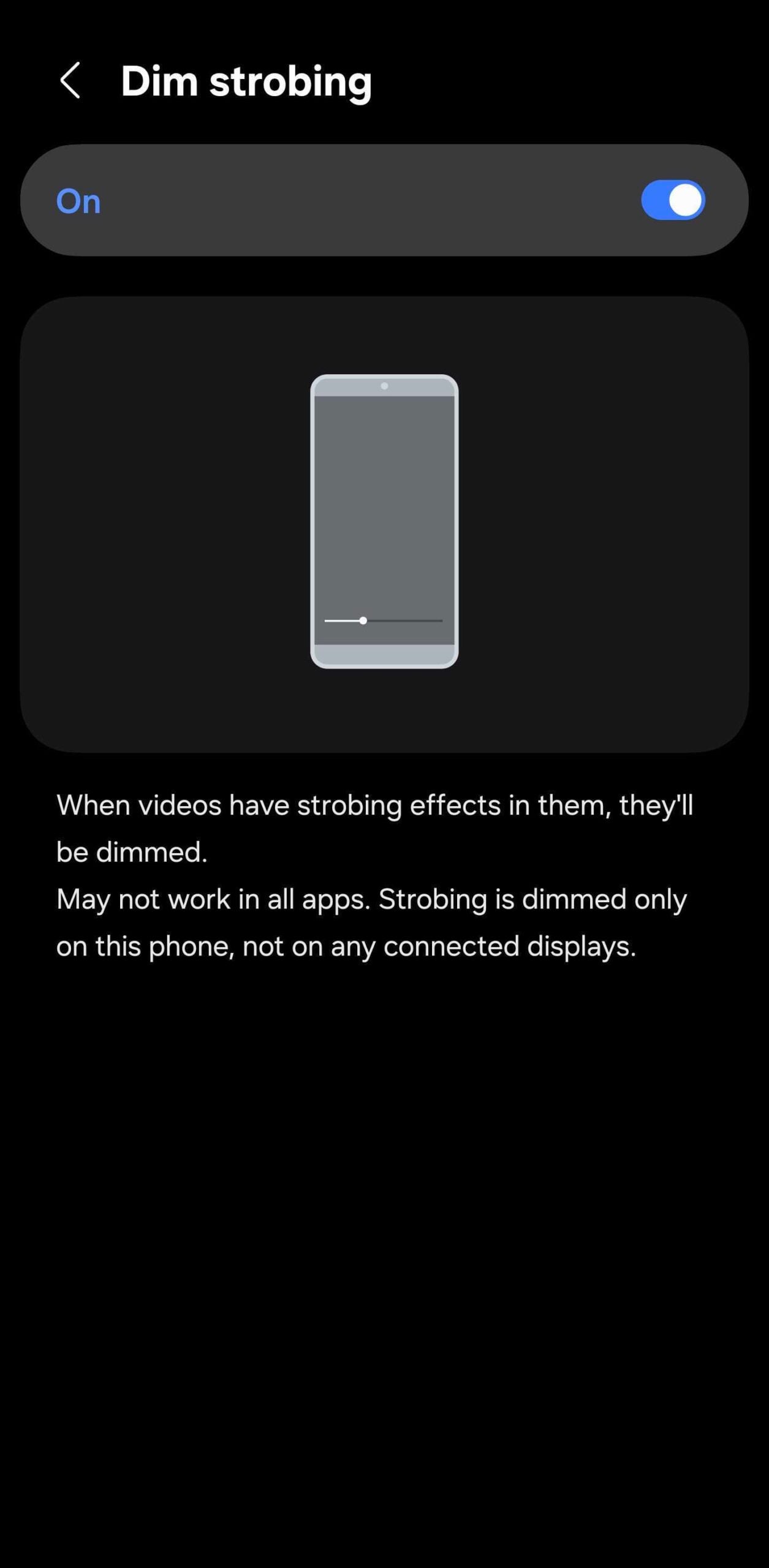
When enabled, this new accessibility option automatically dims videos with strobing effects to make content more comfortable to watch. This is particularly useful in an era where short-form video content often utilizes fast cuts and bright flashes that can be jarring or even dangerous for some individuals. While you might expect this feature to be easily searchable, the current version of One UI 8.5 requires a manual path to locate it, as the redesigned search field in the Settings app may not yet index this specific toggle.
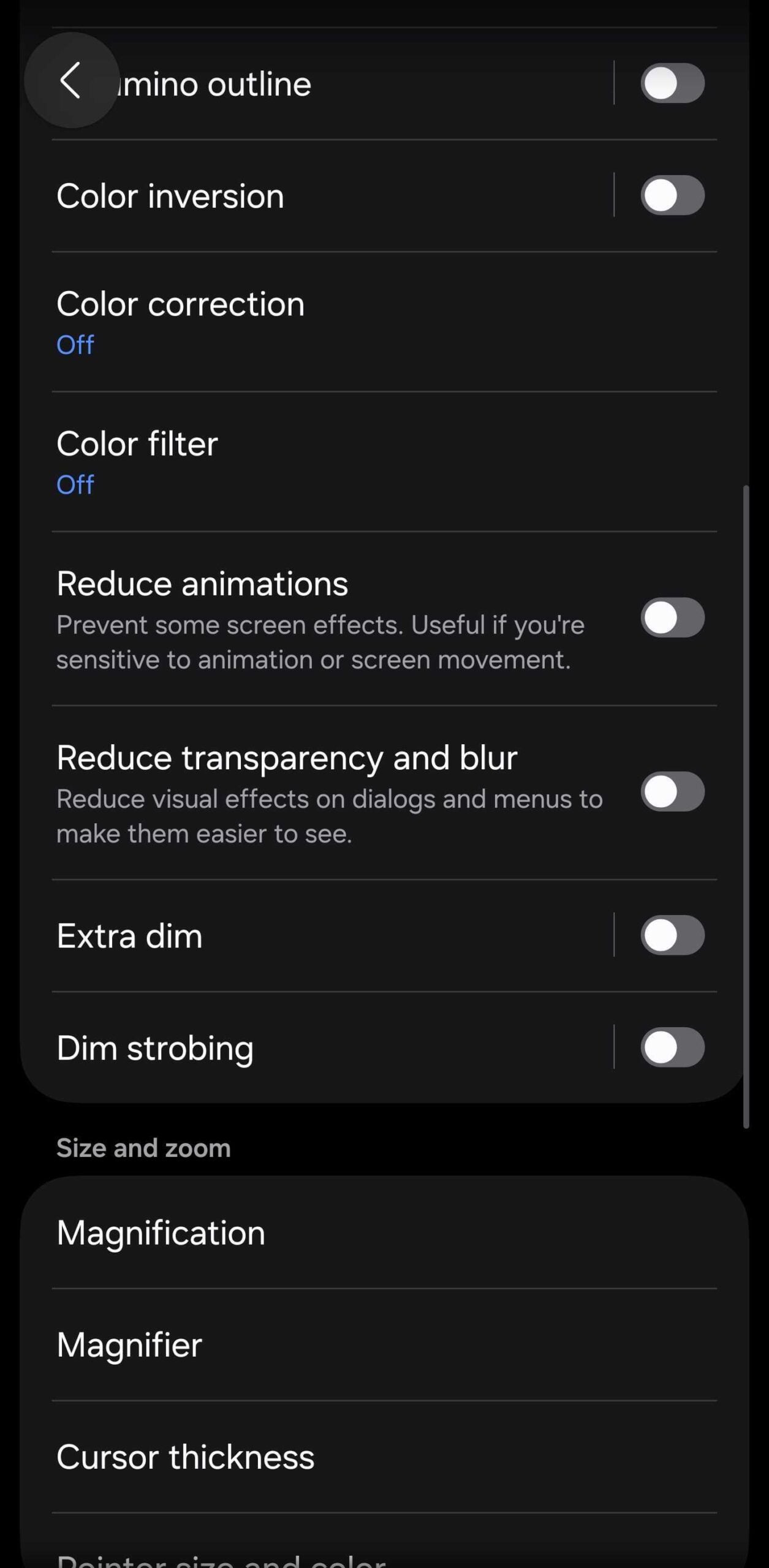
To activate this protection on your device, follow these manual steps:
- Open the Settings app on your One UI 8.5 device.
- Navigate to the Accessibility section.
- Select Vision enhancements.
- Toggle the Dim strobing switch to On.
Important Considerations and Limitations
According to Samsung, this feature may not work in every app or with all types of video content. It relies on real-time detection of light patterns, which can vary depending on the video encoding and the application's player. Furthermore, it is important to note that this setting does not sync across your Samsung device ecosystem. Dim strobing works only on the specific One UI 8.5 device where you enable it.
For users who own multiple devices, such as a Galaxy phone and a Galaxy Tab, you will need to enable the feature manually on each one. As long as the hardware is running One UI 8.5, you can enjoy this added layer of visual safety across your entire mobile setup.
What exactly does the Dim Strobing feature do?
The Dim Strobing feature is designed to detect videos that contain rapid flashes or strobing light effects. Once detected, the software automatically lowers the screen brightness or reduces the intensity of those specific flashes to prevent eye strain or seizures in photosensitive users.
Does this feature work on all Samsung devices?
Currently, this feature is exclusive to devices running the One UI 8.5 firmware update. Older versions of One UI do not include this specific accessibility toggle.
Why can't I find Dim Strobing using the search bar in Settings?
In the initial release of One UI 8.5, some new settings might not be fully indexed in the redesigned search field. If searching doesn't work, you must navigate manually via Settings > Accessibility > Vision enhancements.
Will enabling this affect the battery life of my Galaxy phone?
The impact on battery life is negligible. While the device does perform some real-time analysis of video content to detect strobing, it is optimized to run efficiently in the background without significant power drain.
Does it work for third-party apps like YouTube or TikTok?
Samsung notes that the feature may not work in every application. While it is designed to be system-wide, its effectiveness can depend on how specific apps render video content.
🔎 In conclusion, the addition of the Dim Strobing feature in One UI 8.5 is a commendable move by Samsung toward better digital health and safety. By providing tools that cater to users with photosensitivity, Samsung is setting a high standard for mobile accessibility. If you or someone you know is sensitive to flashing lights, taking a moment to manually enable this setting is a simple yet effective way to ensure a much safer and more pleasant smartphone experience.
Post a Comment