
Samsung One UI 9.0: Revolutionizing Productivity with Seamless Cross-Device Continuity
The upcoming One UI 9.0 update, which is set to be based on the Android 17 architecture, is poised to bring a significant leap in how users interact with their Galaxy ecosystem. During the recent Google I/O developer conference, new details emerged regarding a flagship feature titled "Continue On." This functionality represents a sophisticated evolution of the current "Continue Apps on Other Devices" feature that Samsung users have enjoyed for years, aiming to bridge the gap between smartphones, tablets, and potentially even laptops more effectively than ever before.
- ✨ One UI 9.0 will introduce the "Continue On" feature based on Android 17.
- ✨ Users can seamlessly resume app activities, such as web browsing and document editing, across Galaxy devices.
- ✨ The feature expands support beyond Samsung-specific apps to include major Google services like Chrome and Docs.
- ✨ Future updates may include synchronized media files and notifications for a unified experience.
How "Continue On" Enhances the Galaxy Experience
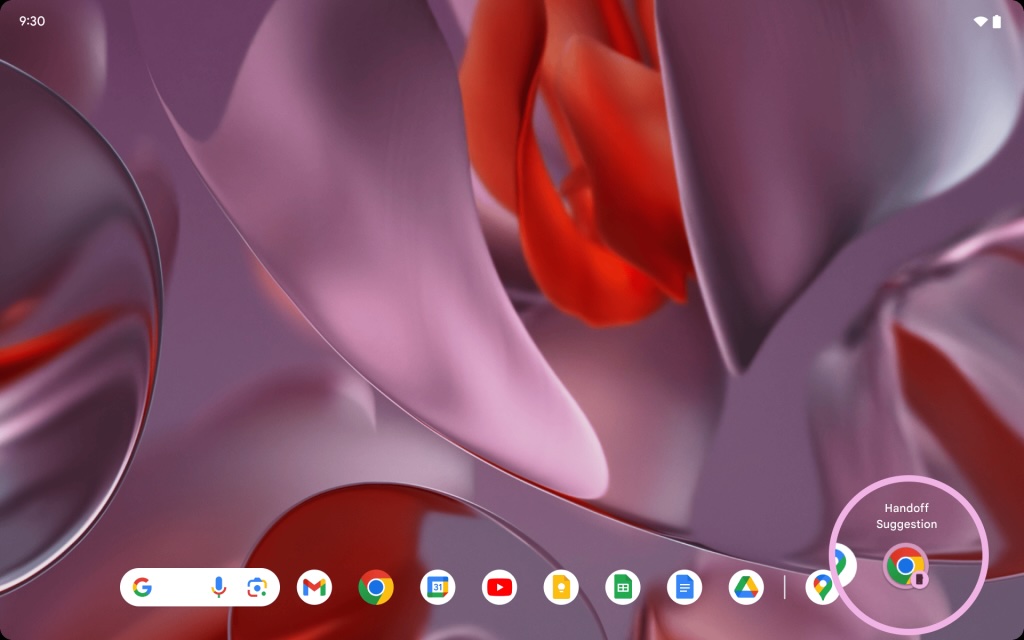
The "Continue On" feature is designed to make transitions between devices feel instantaneous. For instance, if you are currently reading a detailed report or browsing a specific webpage on your Galaxy phone using Google Chrome, a dedicated icon will automatically appear on your Galaxy Tab's taskbar. By simply tapping this icon, the tablet immediately opens the exact same URL, allowing you to pick up exactly where you left off on a larger screen.
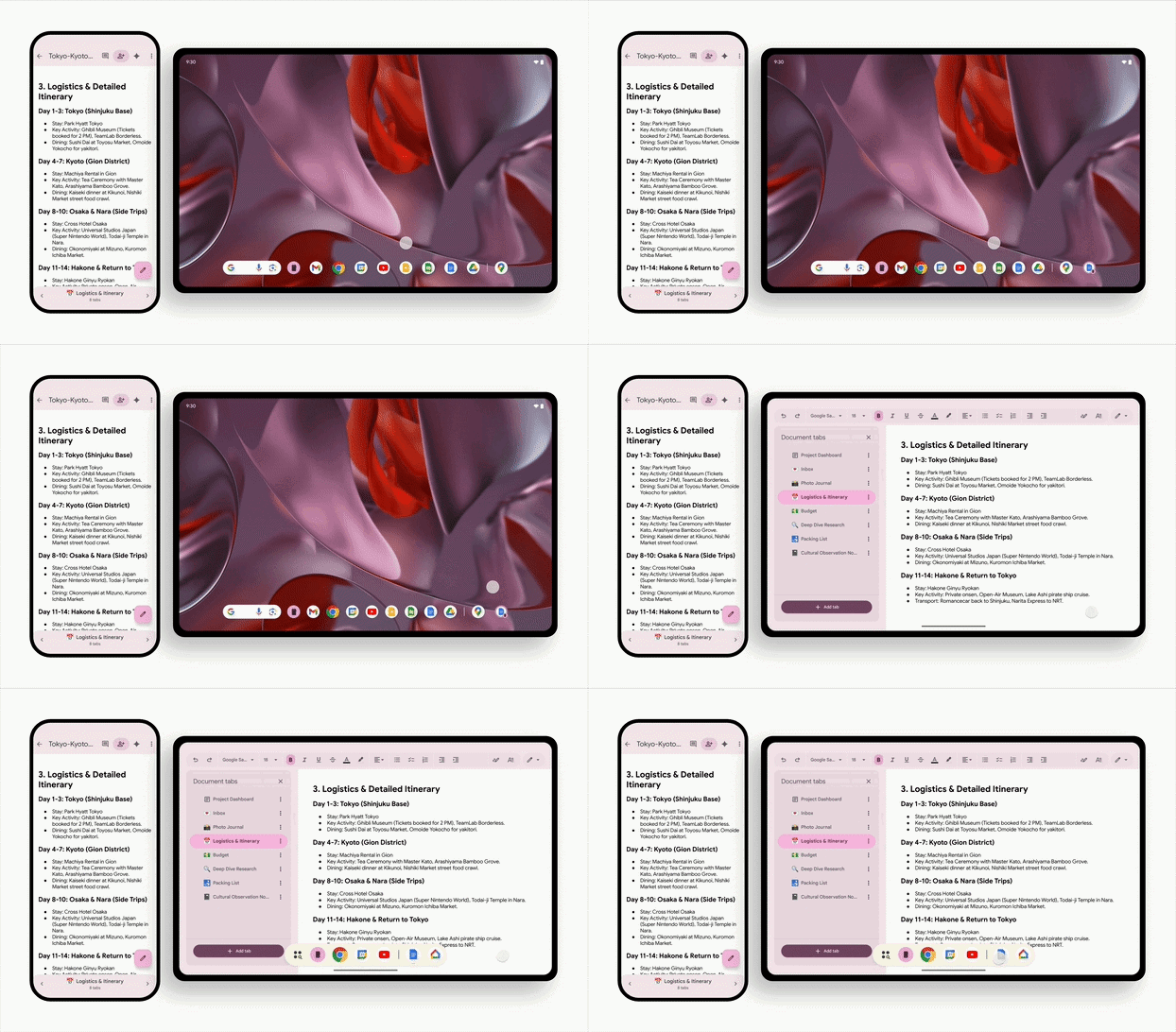
This level of continuity extends to productivity suites as well. If you are in the middle of editing a document in Google Docs on your handheld device and then switch to your tablet or foldable, the Google Docs icon will manifest in the multitasking dock. Tapping it will load the document at the precise cursor position, mimicking the "Handoff" experience found in competing ecosystems but optimized for the Android environment.
Technical Requirements and Future Possibilities
To utilize these advanced features, both devices must be signed into the same Google account and maintain an active internet connection. While the initial rollout is focused on Android phones and tablets, industry experts anticipate that One UI 9.0 will eventually extend this synergy to ChromeOS laptops and "Googlebooks." Furthermore, early leaks suggest that this framework will eventually support the synchronization of media files and real-time notifications across all logged-in hardware.
Currently, Galaxy devices already offer a similar suite of tools, but they are largely restricted to the Samsung ecosystem, such as Samsung Internet and Samsung Notes. These existing tools allow for a shared clipboard—enabling users to copy text or images on a phone and paste them on a tablet—and the ability to sync Wi-Fi credentials effortlessly. One UI 9.0 aims to break these "walled garden" limitations by integrating deeper with Google’s core applications.
Integration with Windows and Galaxy Books
Samsung's commitment to productivity isn't limited to mobile OS platforms. Galaxy Book laptops already utilize Microsoft’s Phone Link service to provide a level of app continuity. This currently allows users to resume Spotify playlists or Microsoft Office tasks across their PC and mobile devices. With the arrival of Galaxy devices running One UI 9.0, the integration between Windows 11 and Android is expected to become even more seamless, further solidifying Samsung's position as a leader in cross-platform efficiency.
What exactly is the "Continue On" feature in One UI 9.0?
"Continue On" is a productivity feature based on Android 17 that allows users to start a task on one device and resume it instantly on another. It works by showing an app icon on the second device's taskbar or dock that, when tapped, opens the exact same content or state from the first device.
Will "Continue On" work with non-Samsung apps?
Yes. Unlike previous versions that were limited to Samsung Internet and Notes, the new version showcased by Google includes support for major Google apps like Chrome and Google Docs, making it much more versatile for professional use.
What are the requirements to use these cross-device features?
To use "Continue On," both devices must be running the compatible software (Android 17 / One UI 9.0), be signed into the same Google account, and be connected to the internet. Bluetooth and Wi-Fi are typically used to detect proximity between the devices.
How does this differ from the current "Continue Apps on Other Devices" settings?
The current setting is primarily a Samsung-exclusive feature. The new "Continue On" is integrated at the system level of Android 17, allowing for broader app support and more fluid transitions between different types of hardware, including tablets and potentially laptops.
Can I sync notifications and files using this new update?
While the initial focus is on app continuity, leaks indicate that One UI 9.0 and Android 17 will eventually allow for the seamless sharing and syncing of media files and notifications across all connected Galaxy devices.
🔎 As Samsung continues to refine its software ecosystem, the introduction of One UI 9.0 marks a pivotal moment for mobile productivity. By embracing the cross-device capabilities of Android 17, Samsung is ensuring that Galaxy users have the most cohesive and flexible workflow possible. Whether you are moving from a small screen to a large tablet or transitioning to a Galaxy Book, the boundaries between your devices are set to disappear, making your digital life more intuitive and efficient than ever before.
Post a Comment