
Inside the Upcoming Samsung SmartThings Update: A Complete Look at the New One UI 9.0 Redesign
Samsung has consistently updated the user interface design language across its stock One UI applications, yet its central home automation hub has long awaited a modern visual overhaul. With an upcoming release tied to One UI 9, the SmartThings ecosystem is finally receiving the comprehensive transformation it needs, bringing dynamic aesthetics and streamlined navigation to millions of users worldwide.
- ✨ A brand new pill-shaped floating tab bar brings SmartThings in line with the latest One UI 8.0 and One UI 8.5 design standards.
- ✨ The Home screen introduces dynamic, time-aware live wallpapers and supports custom background imagery for different locations.
- ✨ The Routines tab has been restructured into separate "Discover" and "My Routines" sections to make smart automation exploration effortless.
- ✨ A customizable SmartThings Now card and a fresh set of widgets expand quick-access controls directly from your device display.
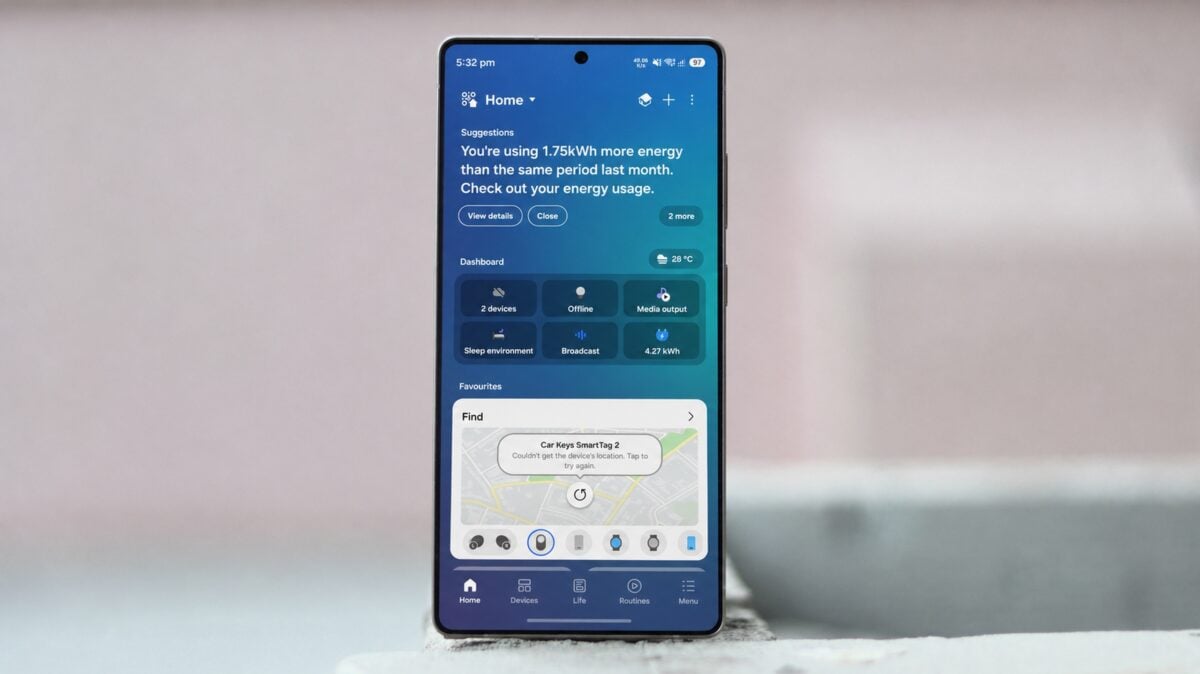
A Major Visual Overhaul for Samsung SmartThings
While previous updates skipped over SmartThings when rolling out major stylistic upgrades to native software, Samsung is actively developing a massive redesign for the application. The upcoming version introduces a sleek, pill-shaped floating tab bar that cleanly separates the interface into five distinct sections: Home, Devices, Life, Routines, and Menu.

The Home screen background now shifts dynamically depending on your configured location. Functioning much like a live wallpaper, it smoothly adjusts its color palette to reflect the time of day—transitioning between morning, daytime, evening, and night. Users can select from nine preloaded live options or choose a personalized photo straight from their device camera or gallery, assigning unique backdrops to individual locations like a primary residence or a vacation home.

At the top of the Home tab, the new SmartThings Now card surfaces helpful suggestions for features you might not have explored yet. This component can be easily toggled on or off according to your preference. Additionally, the application introduces three distinct widget categories: Device Control, Screen Device Control, and Routines.

The Devices tab retains its familiar room-switching functionality while benefiting from the updated dynamic background aesthetics. Meanwhile, the Life section organizes lifestyle-focused utilities—including Clothing Care, Energy, Food, Home Care, and Music Sync—into customizable cards that can be rearranged to suit your daily routine.

Automation management has also been streamlined. The Routines tab is split cleanly into "Discover" and "My Routines." While My Routines houses your personalized home automations, the Discover feed highlights popular workflows created by other users in the global SmartThings community.
Expected Release Timeline
An exact launch date for the revamped application has not yet been announced. However, given that its updated design system directly matches the upcoming software language, industry expectations point toward a rollout following the stable release of One UI 9 for supported Galaxy devices.
When will the updated SmartThings app be officially released?
The exact release date remains unconfirmed, but it is anticipated to arrive alongside or shortly after the stable rollout of One UI 9.
What are the main visual additions in this update?
The update introduces a pill-shaped floating navigation tab bar, time-aware dynamic live wallpapers, custom location background support, and a redesigned Routines section.
Can I use my own photos as a background in SmartThings?
Yes, users can choose from preloaded live wallpapers or select custom images directly from their phone gallery or camera for each saved location.
How is the Routines tab organized in the new version?
The Routines tab is divided into two clear areas: "My Routines" for your personal automations and "Discover" for trending community workflows.
🔎 Ultimately, this comprehensive redesign addresses long-standing user requests for a more cohesive and visually appealing smart home experience across Samsung hardware, bridging the gap between SmartThings and the rest of the modern One UI ecosystem.
Post a Comment