
Samsung Notes App Introduces New Galaxy AI Text Labeling Feature
Samsung has rolled out an update for Samsung Notes that introduces a dedicated AI label to identify content generated through artificial intelligence. While the official changelog simply mentions an added "AI watermark," a closer inspection reveals how this feature functions within your day-to-day note-taking workflow, ensuring transparency without altering the core document layout.
✨ Quick Insights
- Samsung Notes now displays a subtle notice stating “This text was generated using AI” whenever you utilize Galaxy AI editing assistance.
- This discreet label is integrated directly into the result preview window on version 4.4.48.15.
- Unlike graphic image watermarks, this notification does not place any visible marks over your actual note text.
Understanding the New Galaxy AI Text Watermark in Samsung Notes
The Galaxy AI suite integrated into Samsung Notes offers robust tools designed to enhance productivity, including automatic note formatting, smart summarization, spelling corrections, and instant language translation. Whenever users apply these advanced capabilities, the application presents the processed output inside a preview pop-up before final implementation.
Running version 4.4.48.15 of Samsung Notes, the preview pop-up now includes the explicit text statement “This text was generated using AI” located right beneath the generated result. This addition becomes immediately visible when utilizing grammar checks, spelling corrections, and auto-formatting utilities.
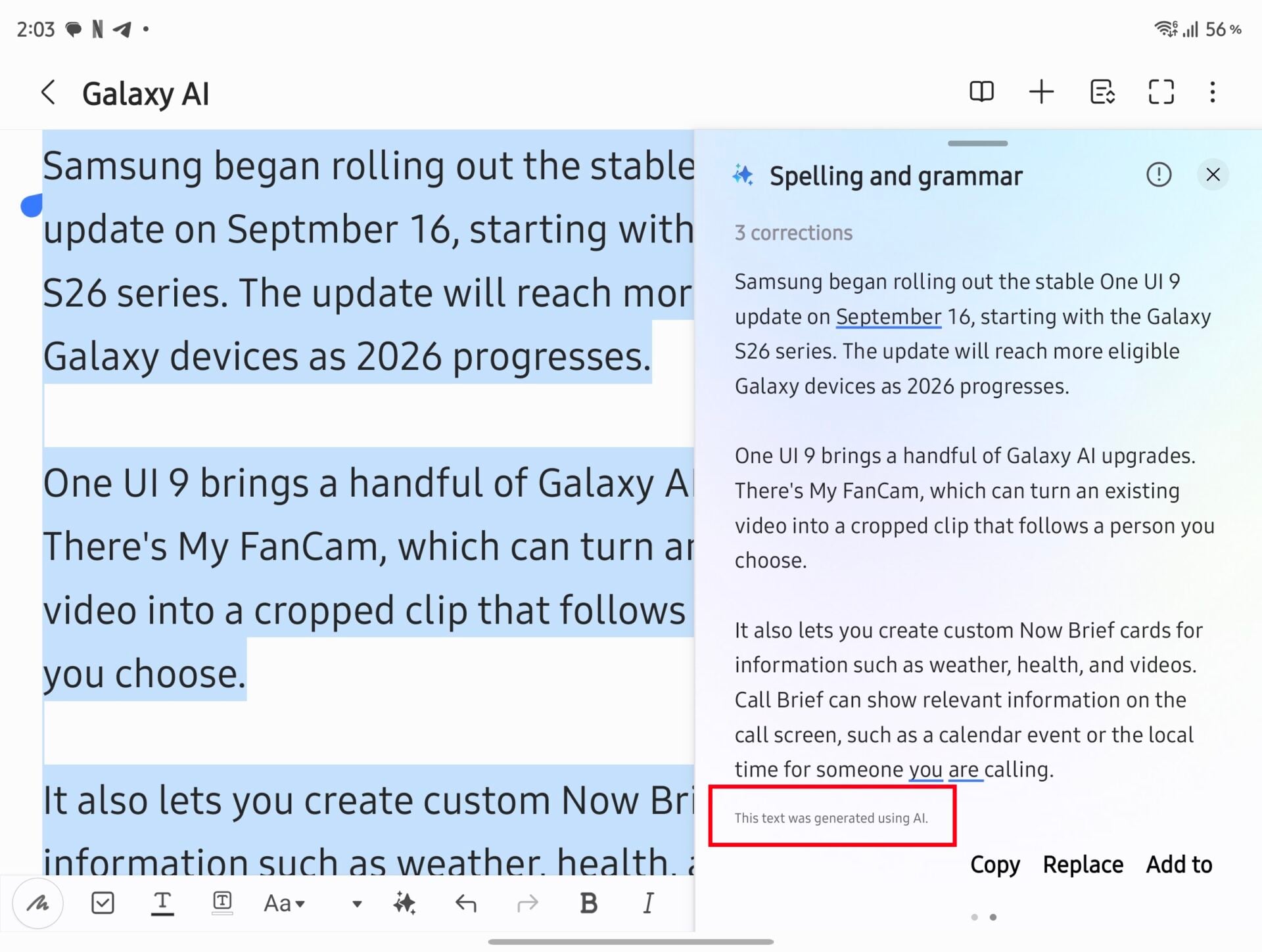
While Samsung previously implemented clear visual watermarks on graphical outputs created via Creative Studio or the built-in wallpaper generator, the approach for text is entirely different. Instead of defacing your written content with visible overlays, the label is restricted strictly to the preview window.
Consequently, you do not need to worry about this update interfering with your documents or making your usage of generative artificial intelligence easily flagged by standard detection software on your notes.
Does the AI label appear directly on my written notes?
No, the label only appears in the preview pop-up window when you review the AI-generated changes before saving them to your document.
Which version of Samsung Notes includes this feature?
This feature is included starting with Samsung Notes version 4.4.48.15.
Will third-party AI detectors easily spot this watermark?
Because the watermark is just a UI preview notice and does not place visual tags over your actual text, it generally will not interfere with external text analysis tools.
Which Galaxy AI features trigger this message?
Features such as automated note formatting, spelling correction, grammar checking, and text summarization will trigger the notification.
🔎 Ultimately, Samsung's subtle approach to labeling AI-assisted content strikes a fine balance between corporate transparency and user experience. By confining notices to preview stages, users maintain clean, readable personal documents while staying fully informed of how their text was optimized.
Post a Comment