
Integrating Google Antigravity Directly into the Gemini App for macOS
In a major step forward for artificial intelligence capabilities, Google has announced a significant update to the Gemini app on macOS, featuring the direct integration of the advanced Antigravity development platform. This rollout arrives as part of ongoing expansions to developer tooling, delivering a seamless and unified software creation experience directly from the desktop application environment.
- ✨ Direct integration of the Antigravity software development platform inside the macOS Gemini app.
- ✨ Leveraging advanced coding performance powered by the new Gemini 4 Argon model.
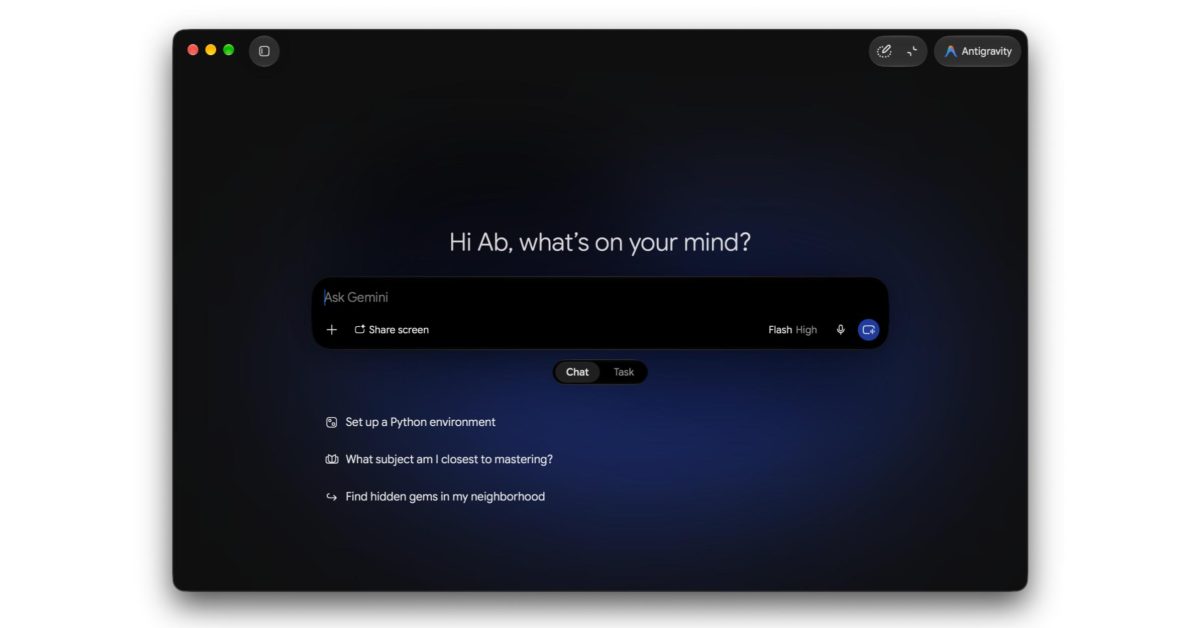
- ✨ Refreshed user interface introducing a Chat and Tasks switcher alongside streamlined section naming.
- ✨ Adoption of the at-symbol (@) for accessing platform skills instead of the traditional slash (/) command.
Details of the Antigravity Integration and App Development
The Google Antigravity platform functions as an agent-driven development environment initially showcased in its second iteration during Google's developer conferences. Formerly operating as a standalone application across various operating systems, it is now embedded directly into the core experience of the Gemini app for macOS, surfacing as a dedicated interface button in the top corner to activate the full developer experience.
This pivotal integration is largely driven by immense enhancements in coding performance delivered by the Gemini 4 Argon release. Users can now design applications and web experiences effortlessly from a single window, though accessing these comprehensive Antigravity capabilities requires an active AI Ultra subscription.

UI Updates and New Features in the Gemini App
Alongside the developer platform integration, the macOS Gemini client receives notable visual and functional upgrades, including a newly designed Chat and Tasks switcher—formerly known as Gemini Spark—conveniently positioned beneath the prompt input box alongside a dedicated scheduled tasks view.

Furthermore, the interaction model for invoking specific skills has transitioned to the at-symbol (@) mechanism rather than forward slashes. Additionally, connected applications have been officially rebranded as Connectors within the customization pane of the side navigation drawer.

What is the Antigravity platform and how does it function inside Gemini?
Antigravity is an agent-powered development utility tailored for programmers and digital creators, newly integrated within the macOS Gemini client to streamline code generation and app engineering through the capabilities of Gemini 4 Argon.
What prerequisites are required to access the new Antigravity tools?
Unlocking full access to Antigravity workflows and development features inside Gemini necessitates an active AI Ultra subscription paired with running the latest application build on macOS.
How has the invocation method for skills changed in the latest update?
Users now trigger various assistant skills by typing the at-symbol (@) directly inside the conversation dialogue box, completely replacing the legacy slash (/) syntax.
What terminology updates have been implemented within the user interface?
Recent updates rebrand Gemini Spark to Tasks, while previously designated connected apps are now formally identified as Connectors under the customization menu.
🔎 In conclusion, the amalgamation of the Antigravity platform with expansive updates to the macOS Gemini application establishes a significant milestone in unifying development workflows and artificial intelligence into a single workspace. We continuously encourage reviewing ecosystem adjustments by heading over to the Source Preferences Page in a new window to maximize your utilization of Google's software ecosystem.
Post a Comment