
Why the Galaxy Z Fold8 Maximizes Its Large Screen Better Than the iPhone Duo
Summary
The Galaxy Z Fold8 transforms the foldable experience by supporting three apps simultaneously, offering significantly more multitasking flexibility than the iPhone Duo's two-app Split View. By combining adjustable layouts, floating pop-up windows, and quick app pairs, Samsung makes large-screen productivity far more intuitive for everyday planning, shopping, and communication.
- ✨ The Galaxy Z Fold8 handles up to three apps at once, whereas the iPhone Duo's Split View is limited to just two apps side-by-side.
- ✨ Keeping chat windows, research data, and core tasks visible simultaneously significantly reduces the need to constantly switch back and forth between applications.
- ✨ Samsung’s flexible layout dividers, interactive pop-up tools, and handy app pairs allow the large display to effortlessly adapt to any user workflow.
The iPhone Duo gives iPhone users a compelling reason to take a closer look at foldable devices. It also raises the core question that comes with paying a premium price for one: what will a larger screen actually change in your everyday mobile usage?
A bigger display certainly makes watching videos and reading articles more comfortable. Crucially, it also provides the physical room needed to run multiple applications at the same time. While that second benefit might not seem obvious at first glance, it becomes indispensable whenever an everyday task requires more than one app to complete.
Planning an event with friends, for instance, often means checking specific details while keeping up with a fast-moving conversation. Every time you switch between apps, another essential piece of the same task gets hidden away. A foldable phone can keep all those pieces together on screen, but how well that works depends entirely on the multitasking options it provides.
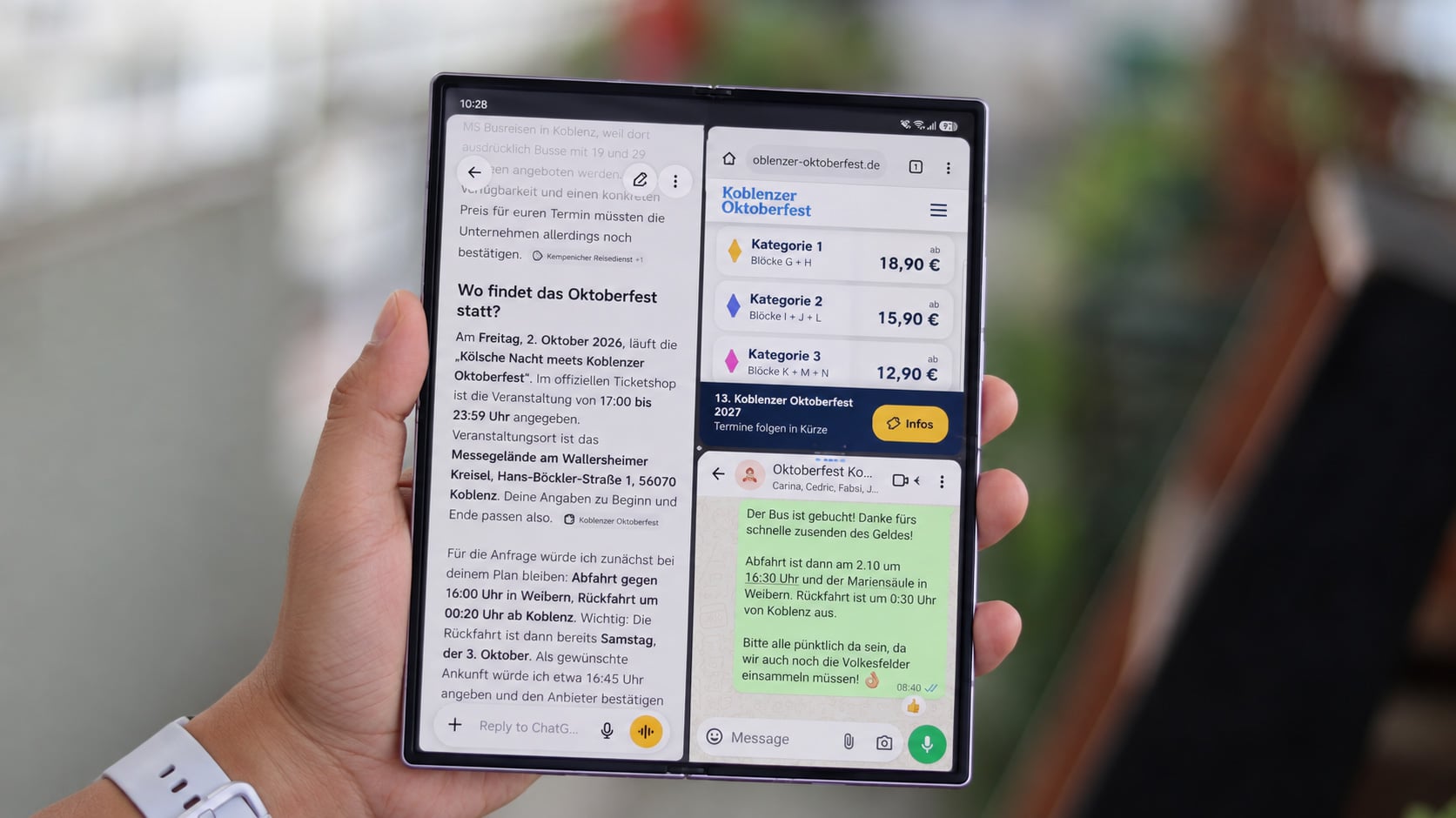
Apple's announced Split View lets two apps sit comfortably side by side on the iPhone Duo. Meanwhile, the Galaxy Z Fold8 supports three active apps. That extra app slot keeps your conversation visible right alongside the information you are verifying and the search or booking page you are working on. In a restrictive two-app layout, a crucial part of your workflow inevitably gets pushed out of view.
Complex Tasks Often Require More Than Two Apps
Think about trying to choose a hotel room with a friend. You ideally want your group chat open right beside the hotel specifications, alongside an interactive map to check how far the location is from the local attractions you want to visit. When online shopping, you might need a product page in a shopping application, a detailed expert review in a web browser, and a chat window open with the person you are buying the gift for. The specific applications change, but every single window has a valid reason to be on screen.
I used this exact approach when organizing an outing with friends. Our group chat remained open right next to the official event website and ChatGPT. The event website displayed ticket details, locations, and schedules, while ChatGPT quickly helped me find local bus companies to contact for transportation. I could reference both sources simultaneously as we finalized our plans in real-time.
My daily work routine often follows a similar pattern. I might have a post open on social media, verify its original source in a web browser, and discuss the findings with my team on Slack. Keeping the original post side-by-side with my research and the team conversation helps me accurately compare what is being claimed against what I have actually discovered.
The conversation directly shapes what I need to look up next, and what I discover can immediately alter the conversation. Keeping both visible alongside your next step eliminates the tedious back-and-forth toggling between apps just to complete a single task.
Dynamic Layouts That Adapt to Your Workflow
Three active apps do not necessarily require equal screen space at all times. A hotel booking page or a detailed textual review naturally needs more breathing room than a quick, short message. The adjustable dividers on the Fold8 let me easily give the app I am focusing on more space while keeping the others docked neatly alongside it. If the conversation suddenly becomes the primary focus, I can readjust the screen balance instantly.
Readability remains paramount. Two apps are sometimes plenty, and certain types of content are simply better viewed in isolation. Multi Window capabilities also depend heavily on individual app optimization. However, the true benefit lies in having the option to keep a third part of your task visible whenever it adds value, with plenty of room left to read and interact with it comfortably.
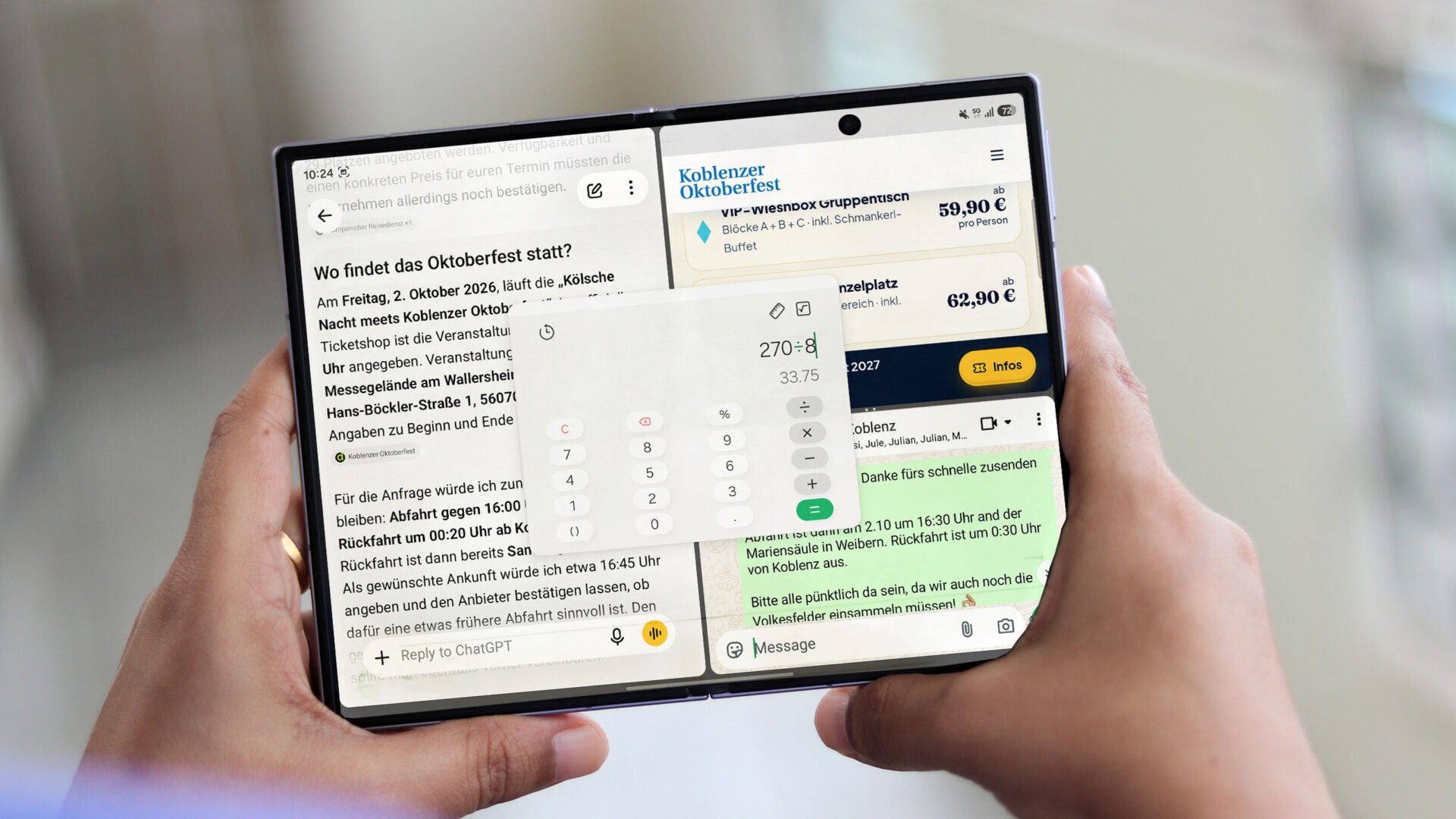
Temporary utility tools can also fit seamlessly around this main layout structure. A calculator and a calendar app can sit inside floating pop-up windows over your three primary apps, helping you easily split a transit quote among friends or check an upcoming calendar date. Samsung's pop-up windows can be freely moved, resized, and minimized into discreet floating icons, meaning a quick calculation doesn't have to force you to close an app you are already using. Once you are finished, the tool vanishes, and your main workspace remains undisturbed.
The dedicated taskbar helps you build and manage this setup as your workflow evolves. You can easily drag a supported app straight into a split-screen view whenever the need arises. For combinations you find yourself using repeatedly, App Pair lets you save two or three specific apps as a single shortcut on your taskbar, home screen, or Apps Edge panel. My custom setup consisting of a social app, web browser, and Slack can then be relaunched together with a single tap.
While Apple also permits users to save app pairs, Samsung's distinct advantage here is the ability to save a robust three-app combination, dynamically adjust it on the fly, or introduce a temporary utility tool the moment a task demands it.
Ultimately, this gives users a genuinely practical reason to unfold their phone. You can keep the vital data behind a major decision right beside the people you are discussing it with, allowing you to execute the next step without repeatedly hiding your resources. For anyone who regularly plans, compares, or conducts research across multiple applications, that level of multitasking flexibility makes the expansive screen space far more valuable.
How many active apps can the Galaxy Z Fold8 display simultaneously?
The Galaxy Z Fold8 supports up to three active apps concurrently in a multi-window split layout, offering greater productivity flexibility than standard two-app setups.
Can you adjust the screen space allocated to each app on the Fold8?
Yes, the device features adjustable dividers that let you easily resize windows on the fly, giving more screen real estate to the app you need to focus on most.
What happens to temporary tools like calculators or calendars when opened?
Temporary tools open in flexible pop-up windows that can be moved, resized, or minimized into floating icons without closing your primary active applications.
What is the App Pair feature used for?
App Pair allows you to save your favorite combinations of two or three apps as a single shortcut on your taskbar, home screen, or Edge panel for instant one-tap launching.
How does the Fold8's multitasking compare to the iPhone Duo?
While the iPhone Duo's Split View supports two apps side-by-side, the Galaxy Z Fold8 goes a step further by supporting a three-app layout alongside advanced pop-up window management.
🔎 In conclusion, the ongoing evolution of foldable smartphones highlights a clear shift toward true portable productivity. Devices that embrace comprehensive multi-app management and adaptive window controls turn a novel hardware form factor into an essential daily powerhouse, proving that screen size is only as good as the software flexibility driving it.
Post a Comment