
Samsung One UI 9.5 Update May Enable Native Call Recording for WhatsApp and Telegram
Recent software leaks indicate that Samsung's upcoming One UI 9.5 update could introduce a highly anticipated feature for Galaxy users: native voice call recording for third-party messaging apps. While Samsung has long supported recording standard cellular phone calls, communicating through VoIP platforms has traditionally required workarounds or third-party applications. This upcoming firmware update aims to bridge that gap, bringing built-in recording capabilities directly to popular communication services like WhatsApp, Telegram, and Google Meet.
- ✨ One UI 9.5 firmware leaks suggest native recording for third-party VoIP calls.
- ✨ Supported applications discovered so far include WhatsApp, Telegram, and Google Meet.
- ✨ Features individual toggle switches located within the standard Phone app settings menu.
- ✨ Regional availability may vary depending on local wiretapping and privacy laws.

How Third-Party Call Recording Works in One UI 9.5
For years, Samsung device owners have enjoyed seamless call recording for standard cellular voice networks. However, as modern communication increasingly shifts toward internet-based messaging platforms, users engaging in daily voice and video interactions on Telegram and WhatsApp were left without a reliable, native recording solution. Attempting to record these sessions often meant relying on unreliable or insecure third-party tools.
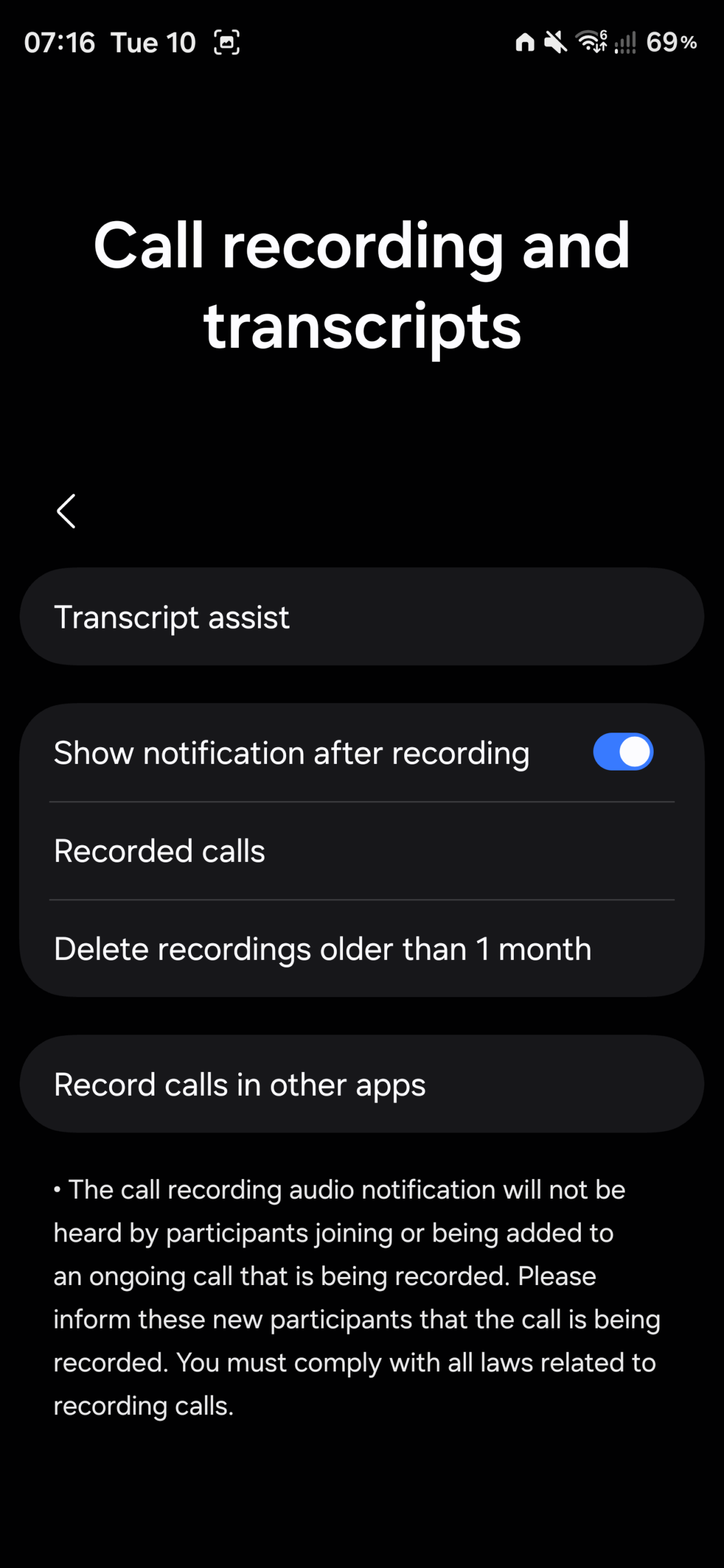
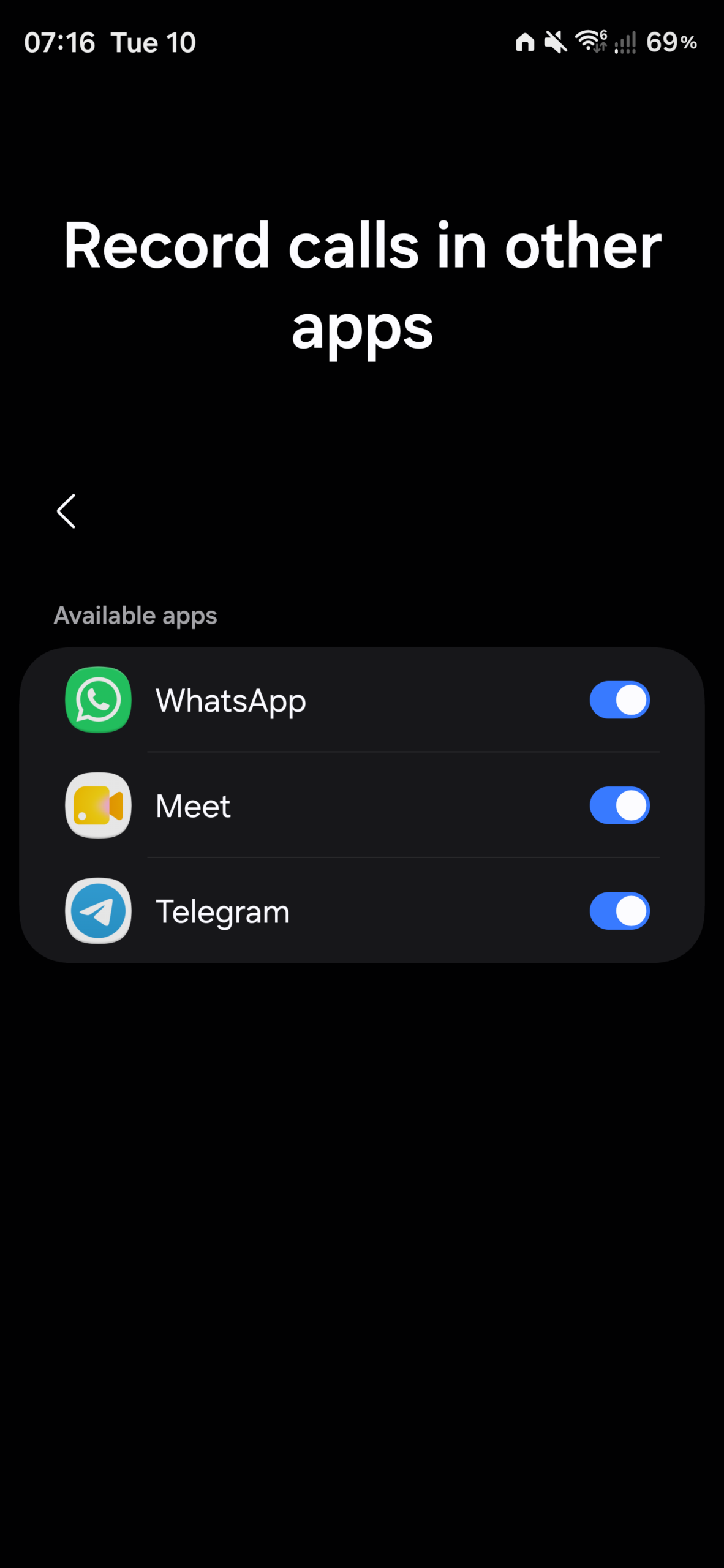
The discovery within the One UI 9.5 build changes this landscape. By navigating to the stock Phone app and accessing Settings > Call recordings and transcripts, users will encounter a new menu option titled Record calls in other apps. Selecting this option opens a dedicated Available apps screen displaying individual toggle switches for compatible services.
As observed in early software evaluations, each supported application features an individual toggle switch to easily enable or disable recording functionality. Because these choices depend on installed applications, the current testing build lists WhatsApp, Google Meet, and Telegram, though Samsung may expand compatibility to additional platforms prior to the public software rollout.
Regional Availability and Legal Considerations
While this feature represents a major quality-of-life upgrade for Galaxy device owners, its availability will likely be subject to geographic restrictions. Local privacy regulations and wiretapping laws vary significantly across global markets. In certain jurisdictions, the operating system may automatically notify the other participant on the call that audio recording is active.
Will all messaging apps support native recording in One UI 9.5?
Currently, the feature appears limited to specific VoIP applications installed on the device, such as WhatsApp, Telegram, and Google Meet. Samsung may add support for more communication apps in future software iterations.
Where can I find the call recording settings for third-party apps?
You can locate the controls by opening the stock Samsung Phone app, going to Settings, selecting Call recordings and transcripts, and tapping on Record calls in other apps.
Will the other person know if their call is being recorded?
Depending on regional laws and local legal requirements, your device may announce an audio notification to the other participant indicating that the call is being recorded.
Do I need to install root apps to record WhatsApp calls?
No. With the integration of this native feature in One UI 9.5, users will no longer need to rely on risky or complicated third-party tools to capture audio from supported VoIP platforms.
🔎 The potential inclusion of third-party call recording in One UI 9.5 underscores Samsung's commitment to enhancing practical software features. By extending reliable audio capture beyond traditional cellular networks, the South Korean tech giant delivers greater versatility for everyday communications, making Galaxy devices even more powerful for personal and professional use.
Post a Comment